ssh连接报错
WARNING: REMOTE HOST IDENTIFICATION HAS CHANGED!
ssh连接报错 WARNING: REMOTE HOST IDENTIFICATION HAS CHANGED! ,原因是 .ssh/known_hosts 中ECDSA密钥指纹发生了变化
$ ssh root@10.0.0.222
@@@@@@@@@@@@@@@@@@@@@@@@@@@@@@@@@@@@@@@@@@@@@@@@@@@@@@@@@@@
@    WARNING: REMOTE HOST IDENTIFICATION HAS CHANGED!     @
@@@@@@@@@@@@@@@@@@@@@@@@@@@@@@@@@@@@@@@@@@@@@@@@@@@@@@@@@@@
IT IS POSSIBLE THAT SOMEONE IS DOING SOMETHING NASTY!
Someone could be eavesdropping on you right now (man-in-the-middle attack)!
It is also possible that a host key has just been changed.
The fingerprint for the ED25519 key sent by the remote host is
SHA256:kqEBDEZiLWDx62xvYHlhvF77srsdzCg7OaoDbyZjkzA.
Please contact your system administrator.
Add correct host key in /Users/hehe/.ssh/known_hosts to get rid of this message.
Offending ECDSA key in /Users/hehe/.ssh/known_hosts:32
Host key for 10.0.0.222 has changed and you have requested strict checking.
Host key verification failed.
解决方法是手动删除报错提示的行或者执行 ssh-keygen -R IP
$ ssh-keygen -R 10.0.0.222
# Host 10.0.0.222 found: line 30
# Host 10.0.0.222 found: line 31
# Host 10.0.0.222 found: line 32
/Users/hehe/.ssh/known_hosts updated.
Original contents retained as /Users/hehe/.ssh/known_hosts.old
使用 ZenTermLite 连接rocky linux报错
终端中使用密钥可以ssh连接
ssh -i id_ed25519 pptfz@10.0.0.111
但是使用 ZenTermLite 一直报错认证失败
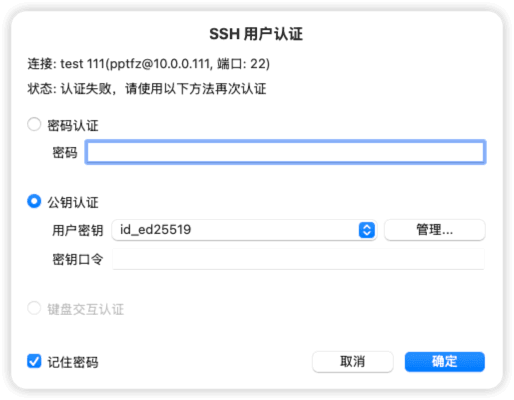
解决方法是修改rocky linux的加密策略,以下方法为临时解决方法,还是和 ZenTermLite 工具本身有关(已经不更新了)
查看加密策略,默认是 DEFAULT
$ update-crypto-policies --show
DEFAULT
修改为 LEGACY 后就可以使用 ZenTermLite 进行ssh登陆了
update-crypto-policies --set LEGACY