腾讯云 MapReduce 集群 core 节点下线过程
[toc]
背景
当前 EMR 的 core 节点需进行升级,对老的 core 节点进行下线操作来替换新的 core 节点 上线。
目标
集群在下线 Core 节点后,数据仍保证完整可靠性,同时集群服务仍正常运行
下线步骤
1.hadoop fsck / 运行健康检查,确认hdfs健康状态为healthy,如果有单副本情况存在,务必调整为多副本。
2.如果数据量较大,务必先调优,否则下线数据迁移异常缓慢。 参考文档: 加快副本复制速度文档
3.开始下线节点 参考文档: 大数据EMR-core节点下线操作
4.申请白名单,控制台缩容节点
第一步、加快副本复制速度
一定要做加快副本复制速度操作,否则复制会特别慢(第一次操作由于没有做此步骤,导致后续复制速度特别慢,经和腾讯云沟通30T数据(2台机器)在不加速的情况下需要大概2周以上!)
1.1 在 emr 控制台的 hdfs-site.xml 里增加如下 5 个参数,下发 NameNode 节点
dfs.namenode.replication.max-streams 20
dfs.namenode.replication.max-streams-hard-limit 40
dfs.namenode.replication.work.multiplier.per.iteration	10
dfs.datanode.balance.max.concurrent.moves 30
dfs.datanode.balance.bandwidthPerSec 52428800
参数说明
| 参数 | 说明 | 默认值 | 参考值 |
|---|---|---|---|
| dfs.namenode.replication.work.multip lier.per.iteration | 决 定 了 可 以 从 很 多 under replication blocks 中选出多少个 block 准备进行复制。如果该参数配 置 得 太 小 , 则 dfs.namenode.replication.max-str eams 配置得再大没有用;可以选出的 block 数与集群 live 的 datadnode 成正比。 | 2 | 10 |
| dfs.namenode.replication.max-streams | 单个 DataNode 最大同时恢复的块数 量,可以间接控制 DataNode 恢复数据 块 的 带 来 的 网 络 等 压 力。 需 要 与 dfs.namenode.replication.work.mu ltiplier.per.iteration 配置项配合 使用; | 2 | 20 |
| dfs.namenode.replication.max-streams -hard-limit | balance/退服性能参数,最高优先级 复制流的数量的硬限制 | 4 | 40 |
| dfs.datanode.balance.max.concurrent. moves | DataNode 上同时用于 Balancer 待移 动 block 的最大线程个数 | 5 | 30 |
| dfs.datanode.balance.bandwidthPerSec | 指定 DataNode 用于 Balancer 的带宽 | 10485760 (10mb) | 52428800 (50mb) |
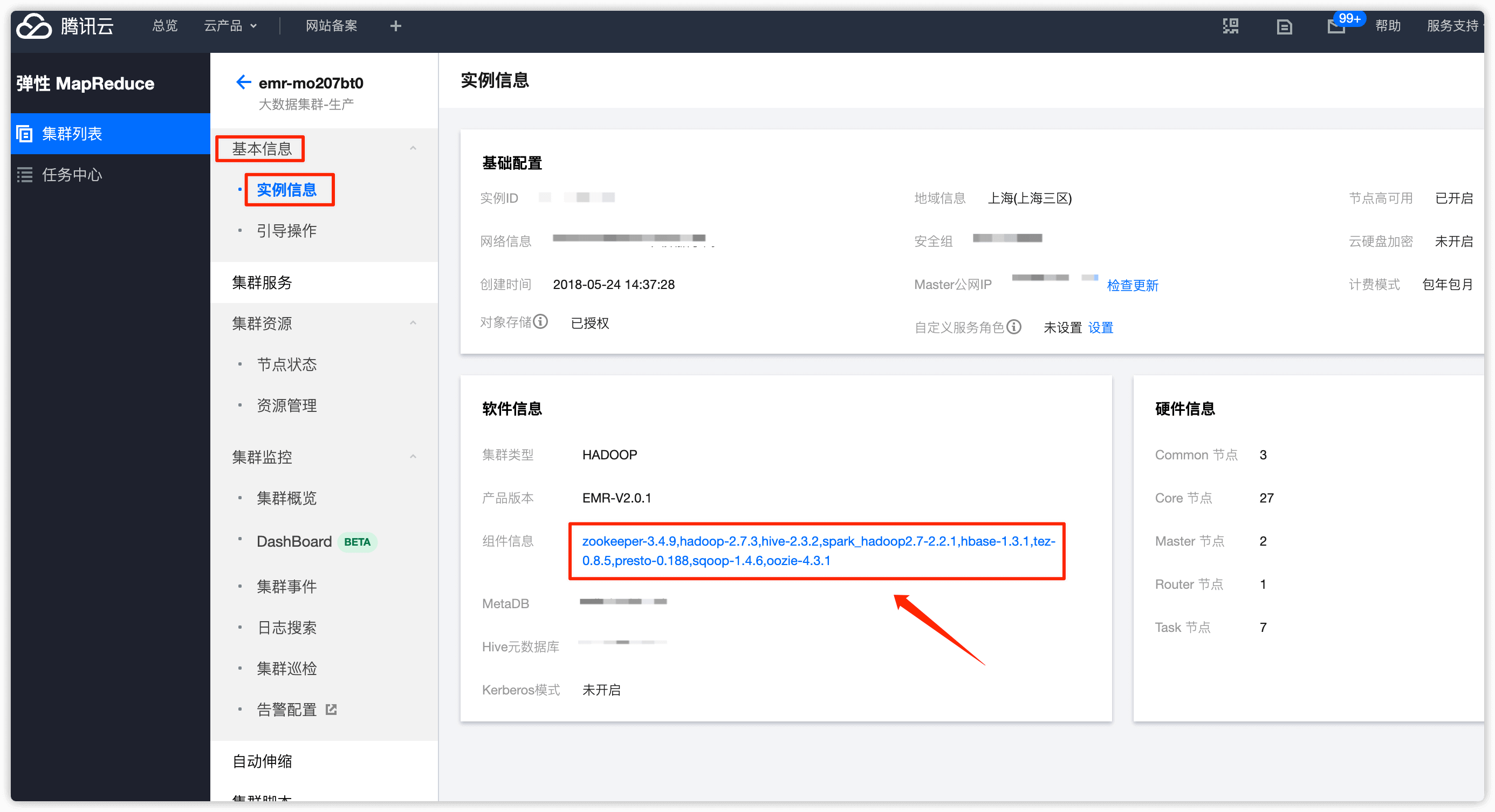
在 基本信息 -> 实例信息 中点击 组件信息
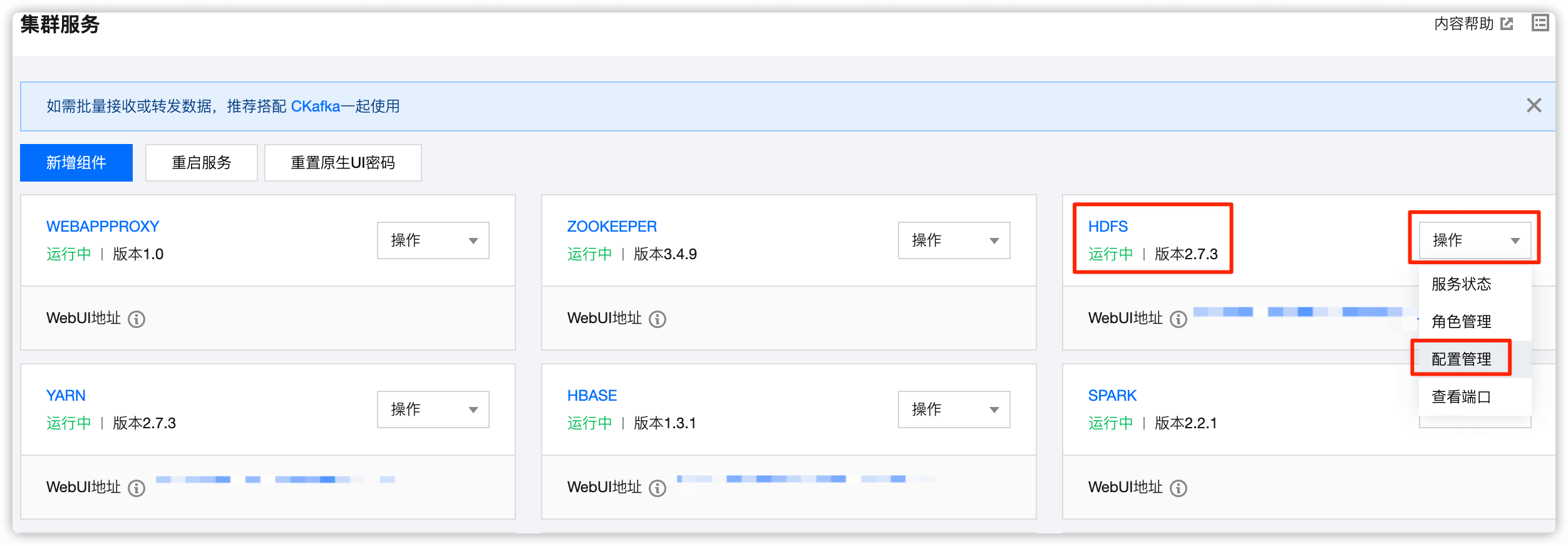
在 HDFS 处点击下拉框,选择 配置管理
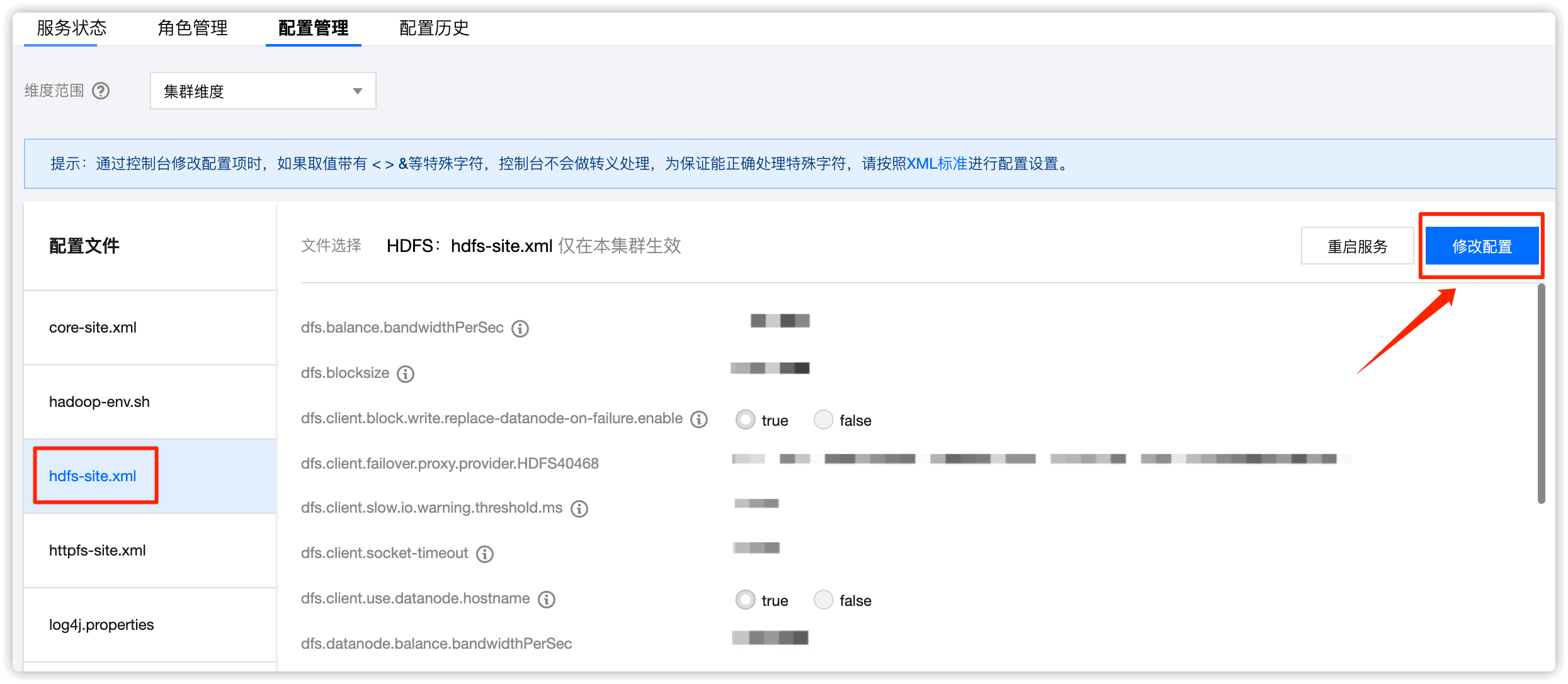
选择 hdfs-site.xml ,然后点击 修改配置
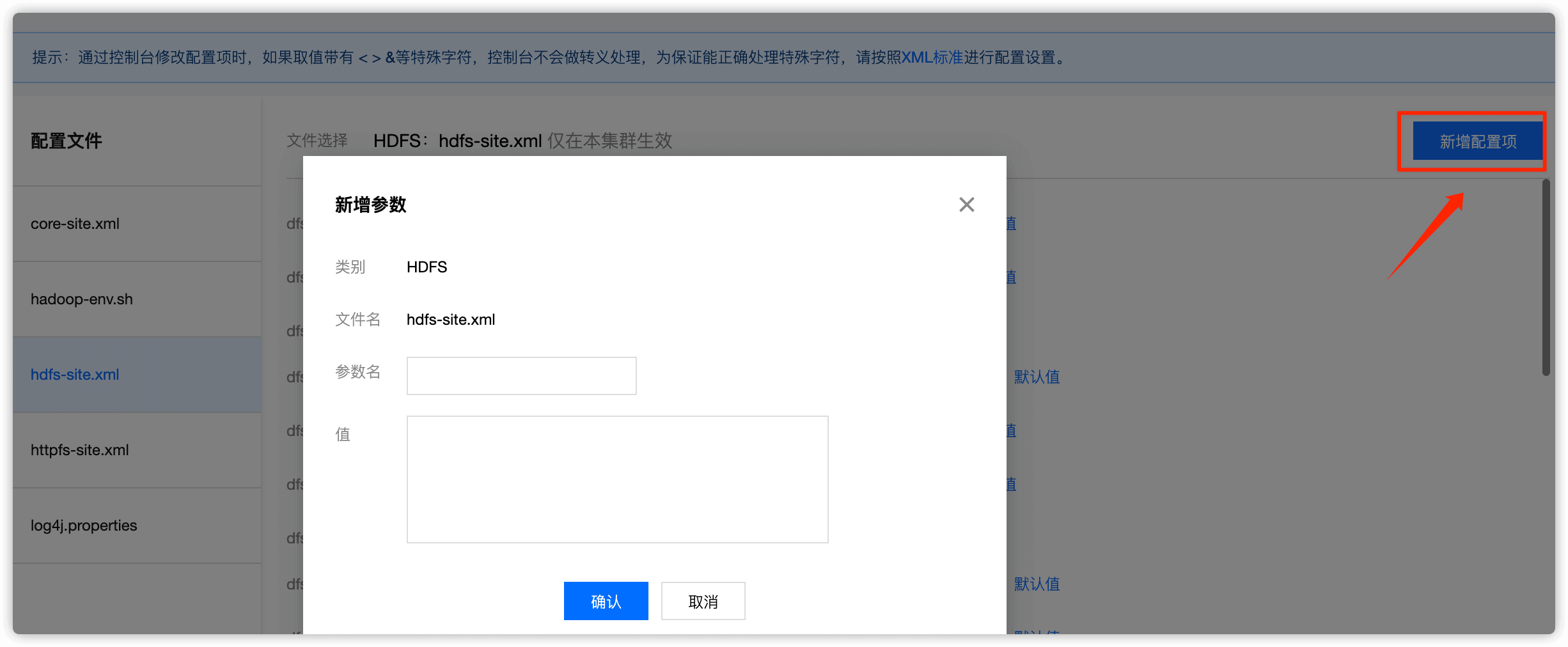
选择 新增配置项,然后把上述5个值依次添加并保存
1.2 重启 NameNode
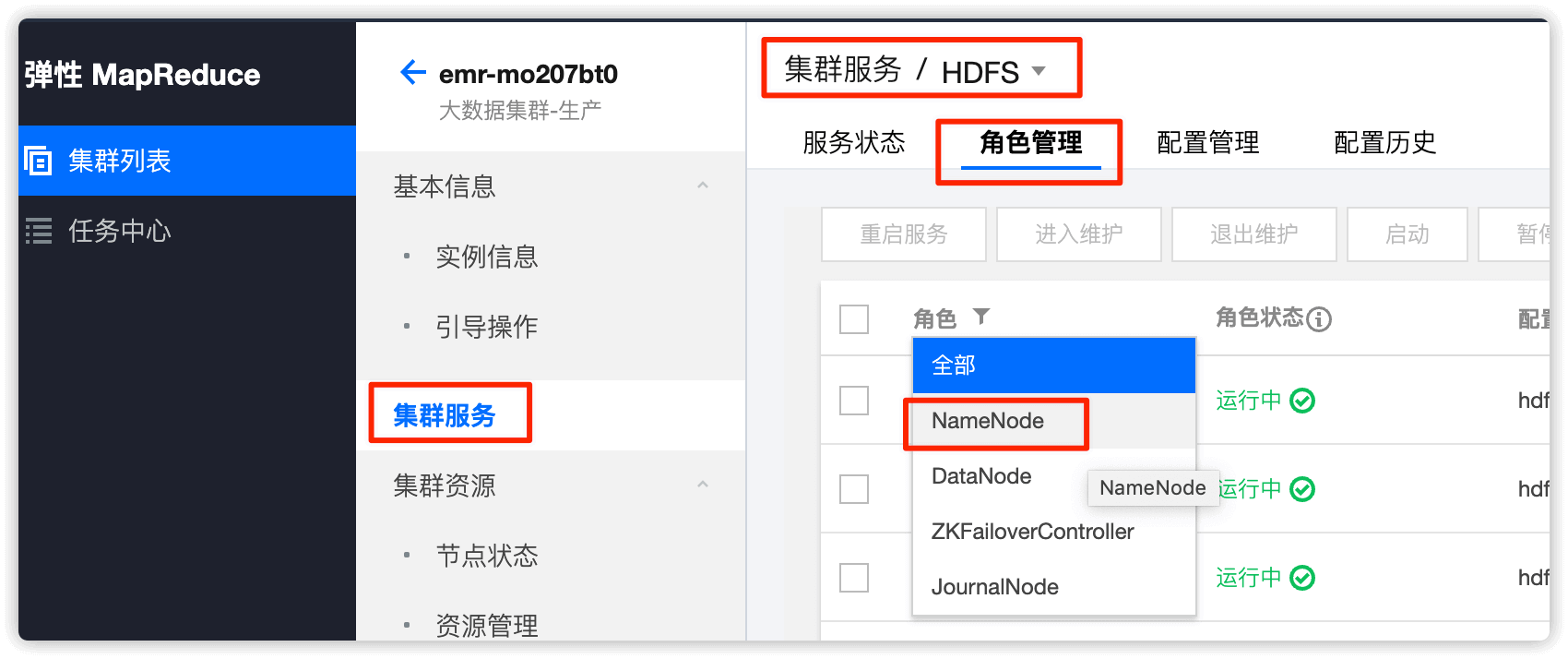
角色选择 NameNode,重启方式选择 安全重启模式,重启NameNode
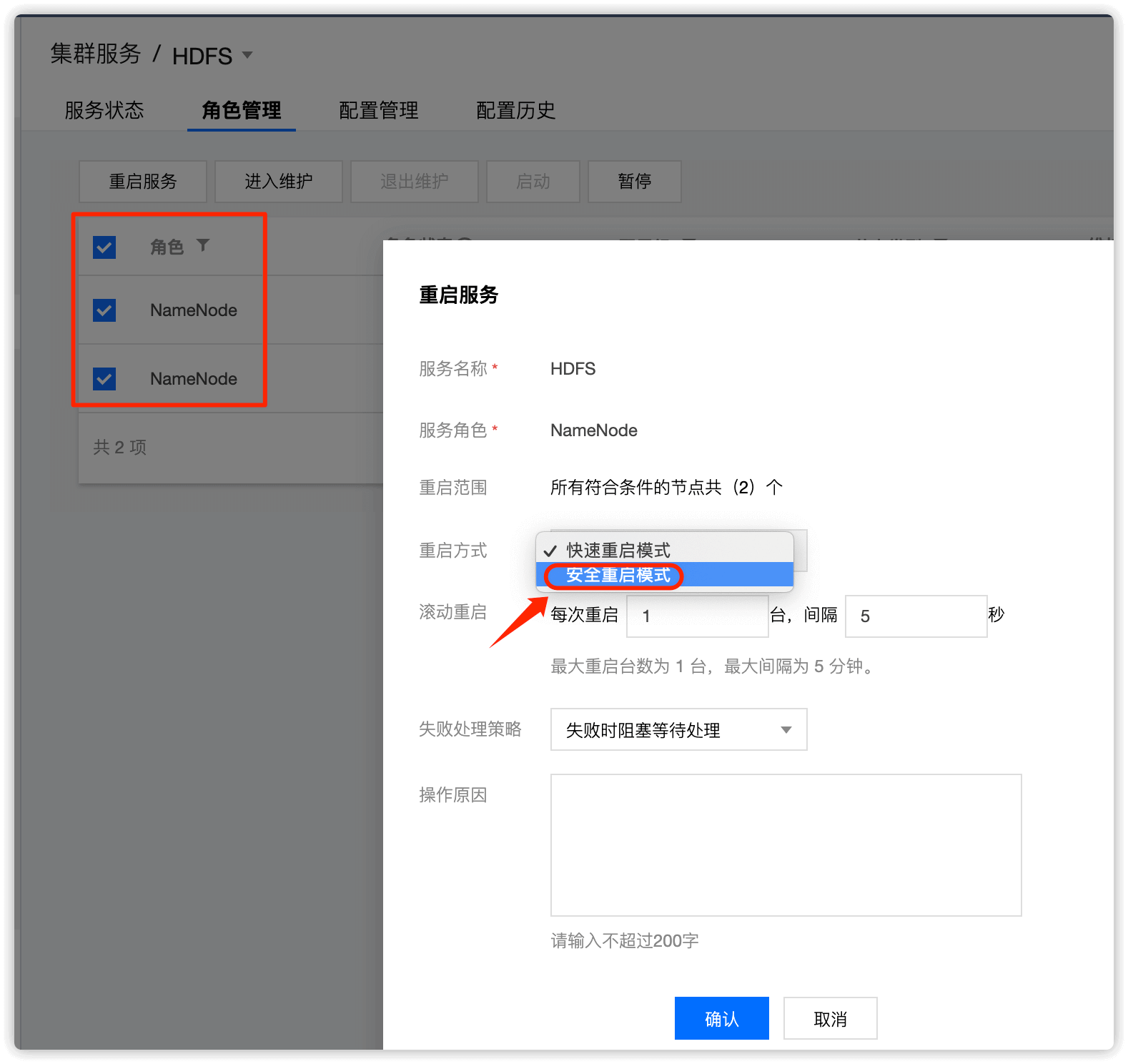
到此,加速副本复制速度操作完成!
常见问题
1.单副本问题
问题描述
HDFS web UI 页面出现如下状况:下线进度停止
blocks with no live replicas栏出现大量块
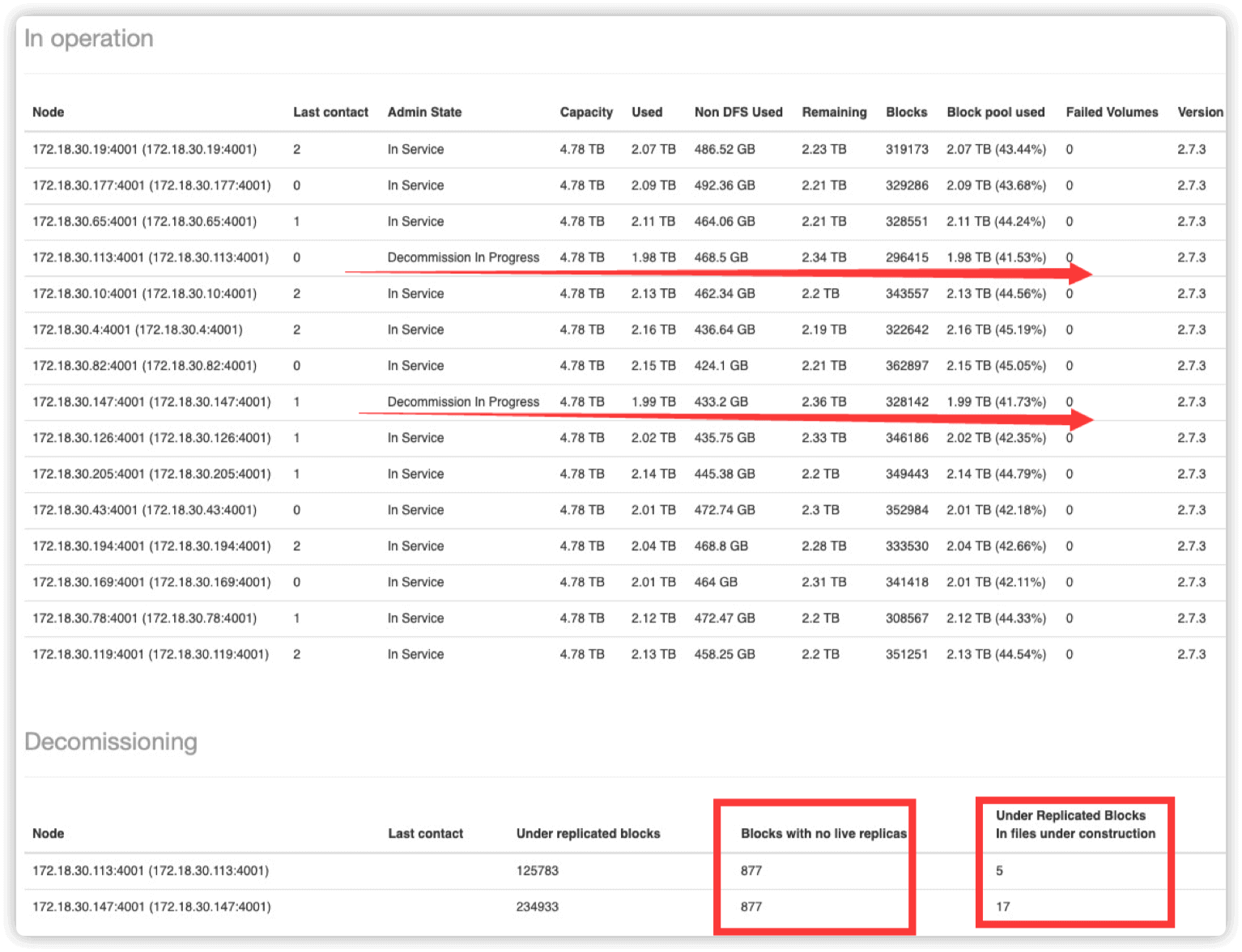
原因
下线节点存在 单副本的情况,hdfs 拒绝继续执行下线以防数据丢失
解决方案
执行命令
hadoop version查看集群 hadoop 版本
Hadoop 2.7 及以下版本 master 运行如下脚本设置单副本块为多副本
cd /data/emr/hdfs/logs

su hadoop -c "hdfs dfsadmin -metasave metasave-report.txt"

cat /data/emr/hdfs/logs/metasave-report.txt | grep "l: 1" | cut -d':' -f1 >> ./single_replica

for hdfsfile in cat /data/emr/hdfs/logs/single_replica; do su hadoop -c "hadoop fs -setrep 3 $hdfsfile"; done
Hadoop 2.8 及以上版本 master 运行如下脚本设置多副本
hadoop fsck / -files -blocks -replicaDetails |grep -C 1 Live_repl=1 |grep OK |awk '{print $1}' >/tmp/single_replica

for hdfsfile in `cat /tmp/single_replica`; do su hadoop -c "hadoop fs -setrep 3 $hdfsfile"; done
运行完,如下即表示问题修复:
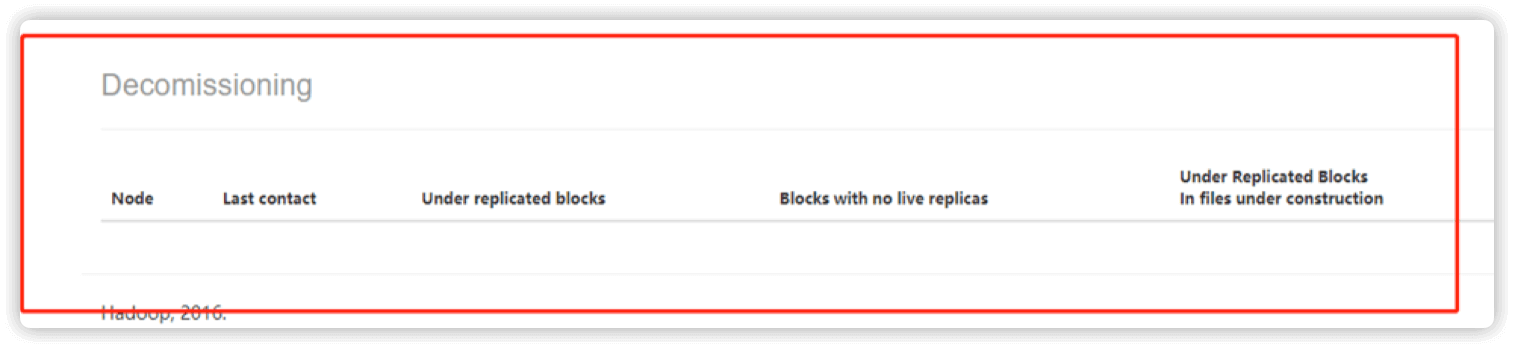
2.DataNode 线程不足问题
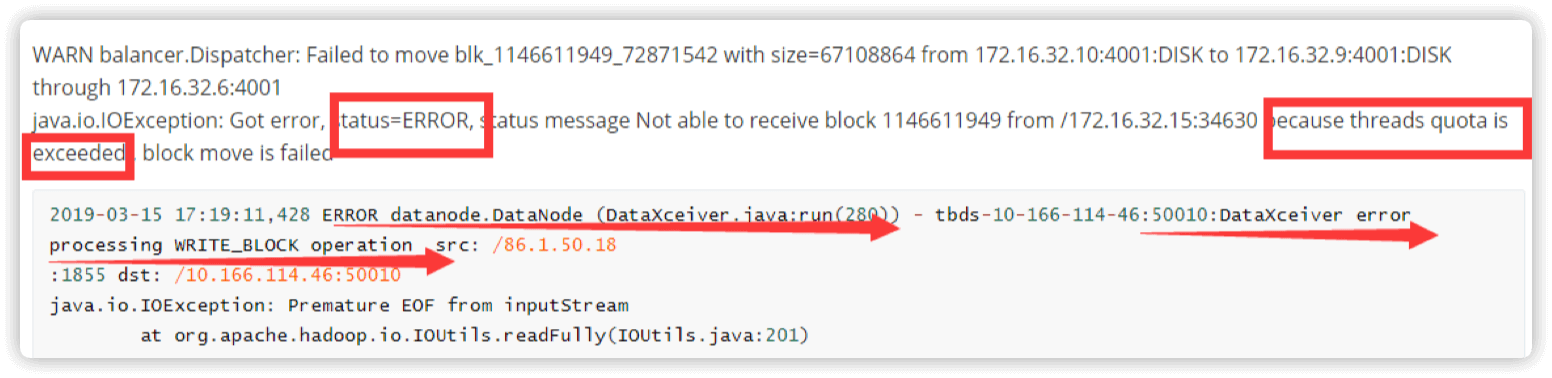
数据迁移过程中 DataNode 有如下信息
Threads quota is exceeded 或者 dataxceiver error 说明 DataNode 线程不足
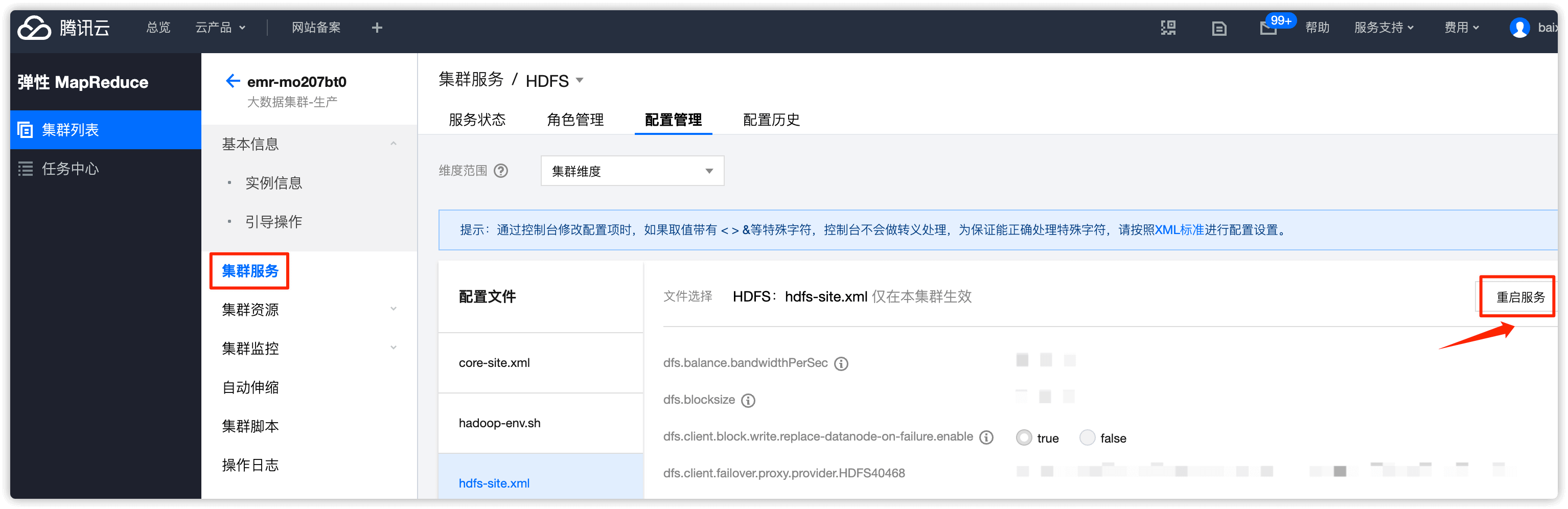
将以下参数添加到 hdfs-site.xml 中并重启 HDFS 集群
dfs.datanode.max.xcievers =16384
第二步、DataNode下线
core节点就是DataNode
2.1 Active Namenode 节点操作
Active NameNode 在hdfs web UI界面查看,生产中我们的 Active NameNode是master节点
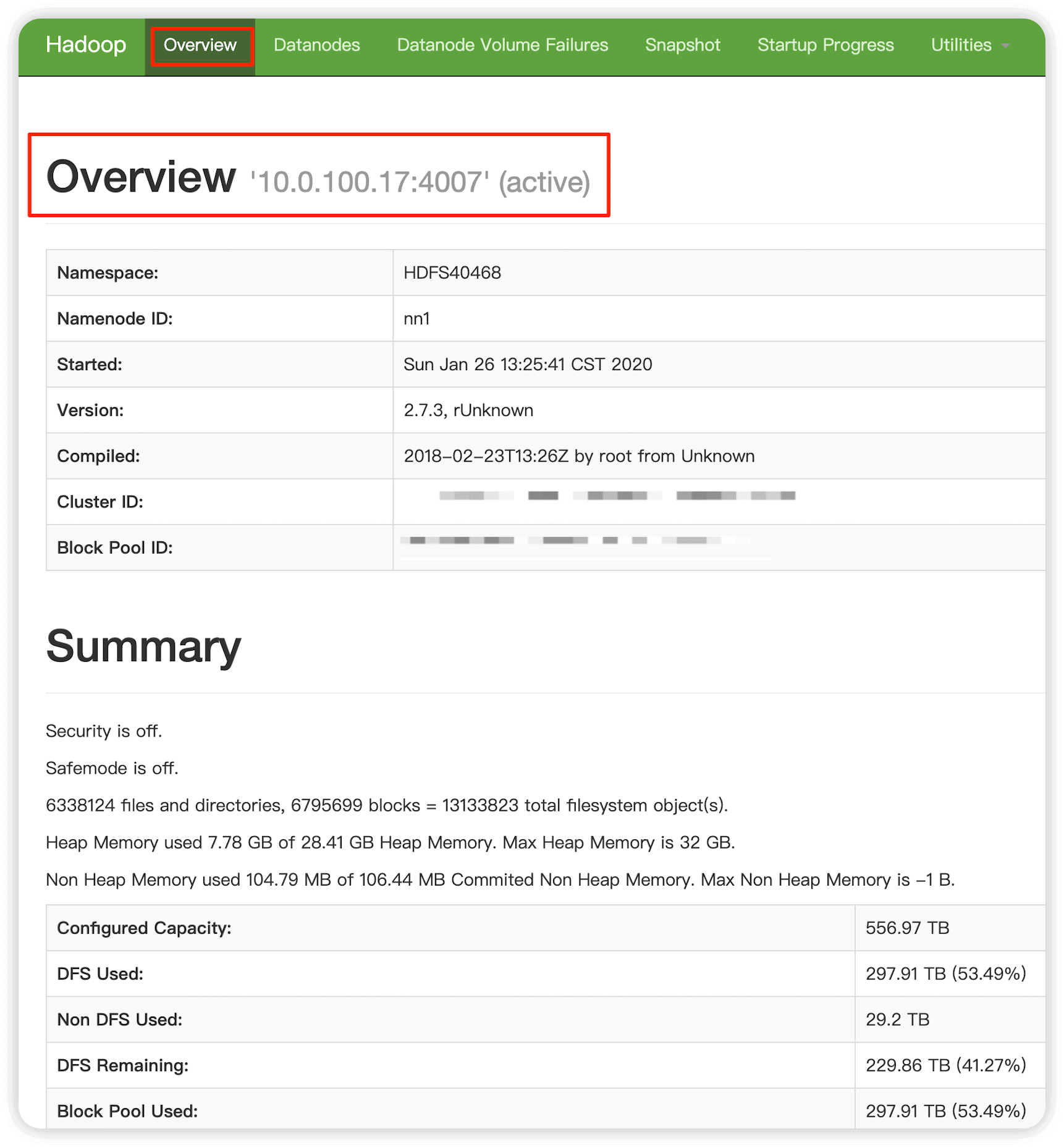
编辑 /usr/local/service/hadoop/etc/hadoop/hdfsexcludedhosts 填写想要下线的节点 IP ,ip 数量建议(1-2 个),一行一个IP
vim /usr/local/service/hadoop/etc/hadoop/hdfsexcludedhosts
获取 active 节点状态,执行命令 hdfs haadmin -getServiceState <serviceId> 查看或者控制台服务监控查看,其中 <serviceId>在hdfs web UI 界面查看(一般为nn1或者nn2,即NameNode1 NameNode2)
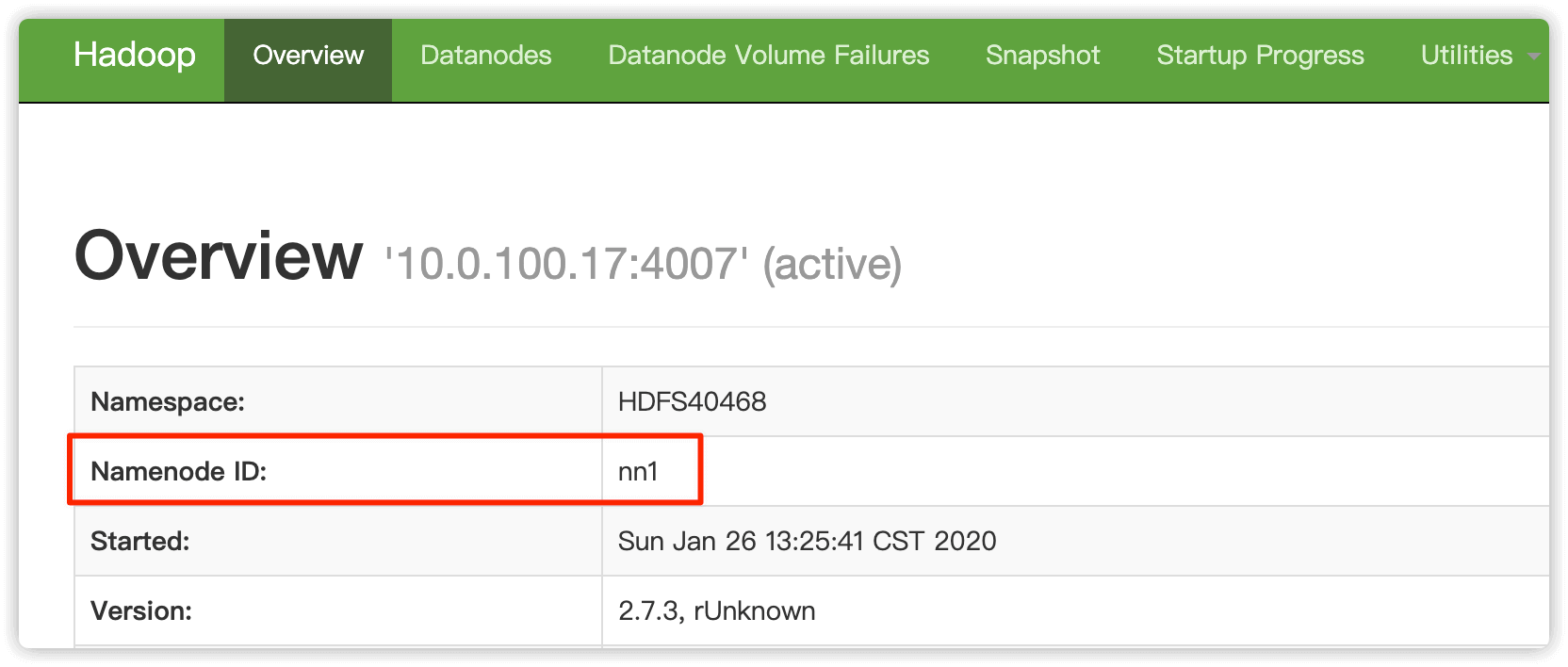
命令执行如下,nn1节点一定要为active状态(这里要看你的实际设置,生产中我们的2个master节点就是NameNode节点),否则集群无法正常提供服务,会导致大数据任务执行失败
$ su hadoop -c "hdfs haadmin -getServiceState nn1"
SLF4J: Class path contains multiple SLF4J bindings.
SLF4J: Found binding in [jar:file:/usr/local/service/hadoop/share/hadoop/common/lib/slf4j-log4j12-1.7.10.jar!/org/slf4j/impl/StaticLoggerBinder.class]
SLF4J: Found binding in [jar:file:/usr/local/service/tez/lib/slf4j-log4j12-1.7.10.jar!/org/slf4j/impl/StaticLoggerBinder.class]
SLF4J: See http://www.slf4j.org/codes.html#multiple_bindings for an explanation.
SLF4J: Actual binding is of type [org.slf4j.impl.Log4jLoggerFactory]
active
nn1节点是 active 状态,nn2节点就为 standby 状态,反之nn1节点是standby 状态,nn2节点就为 active 状态
$ su hadoop -c "hdfs haadmin -getServiceState nn2"
SLF4J: Class path contains multiple SLF4J bindings.
SLF4J: Found binding in [jar:file:/usr/local/service/hadoop/share/hadoop/common/lib/slf4j-log4j12-1.7.10.jar!/org/slf4j/impl/StaticLoggerBinder.class]
SLF4J: Found binding in [jar:file:/usr/local/service/tez/lib/slf4j-log4j12-1.7.10.jar!/org/slf4j/impl/StaticLoggerBinder.class]
SLF4J: See http://www.slf4j.org/codes.html#multiple_bindings for an explanation.
SLF4J: Actual binding is of type [org.slf4j.impl.Log4jLoggerFactory]
standby
2.2 Active NameNode 节点执行 hadoop dfsadmin -refreshNodes
执行成功后最后会提示 Refresh nodes successful for ,其中的两个IP为两个master(NameNode节点)的IP
$ su hadoop -c "hadoop dfsadmin -refreshNodes"
DEPRECATED: Use of this script to execute hdfs command is deprecated.
Instead use the hdfs command for it.

SLF4J: Class path contains multiple SLF4J bindings.
SLF4J: Found binding in [jar:file:/usr/local/service/hadoop/share/hadoop/common/lib/slf4j-log4j12-1.7.10.jar!/org/slf4j/impl/StaticLoggerBinder.class]
SLF4J: Found binding in [jar:file:/usr/local/service/tez/lib/slf4j-log4j12-1.7.10.jar!/org/slf4j/impl/StaticLoggerBinder.class]
SLF4J: See http://www.slf4j.org/codes.html#multiple_bindings for an explanation.
SLF4J: Actual binding is of type [org.slf4j.impl.Log4jLoggerFactory]
Refresh nodes successful for /10.0.100.17:4007
Refresh nodes successful for /10.0.100.11:4007
2.3 hdfs web UI 界面验证
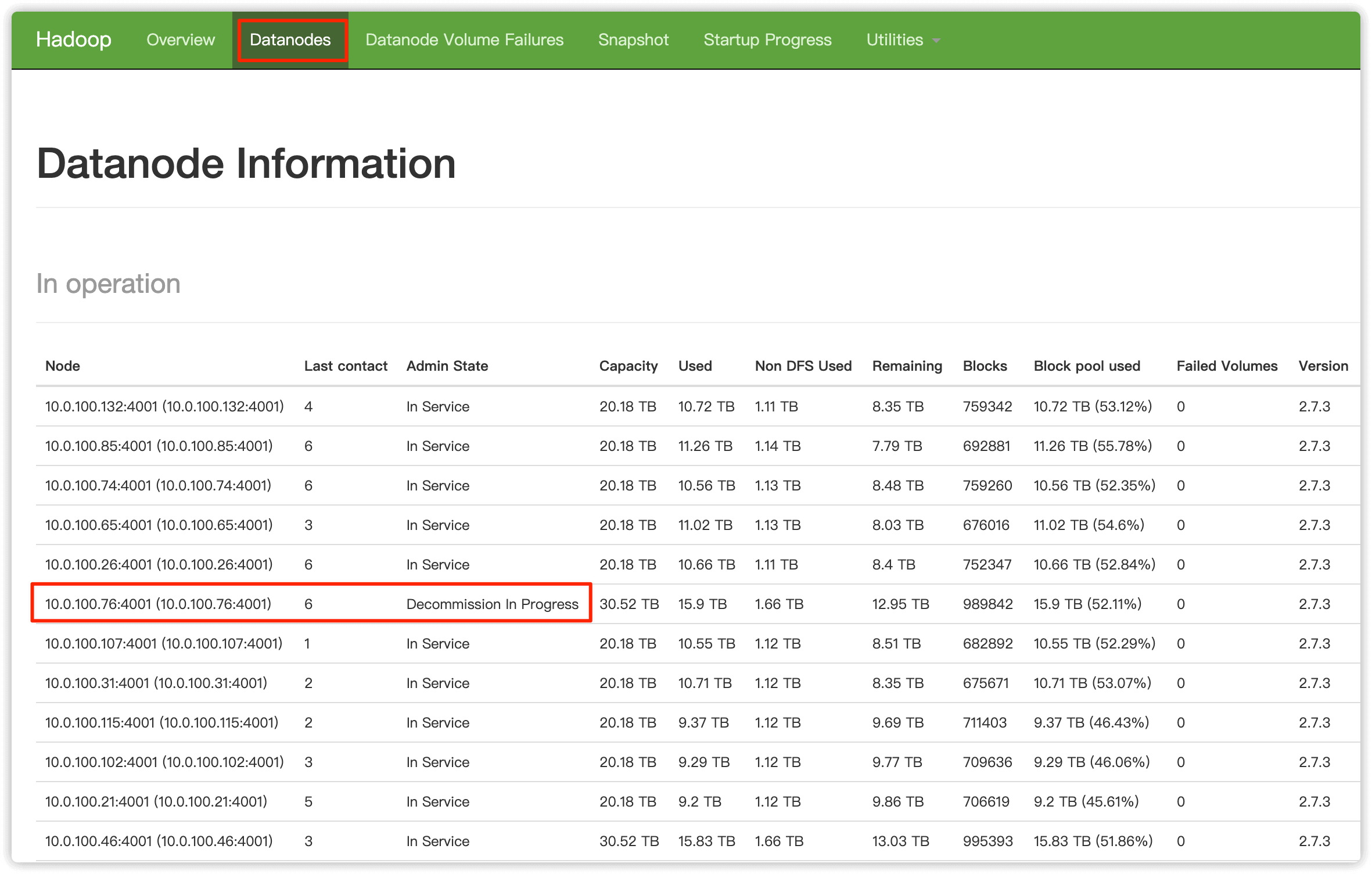
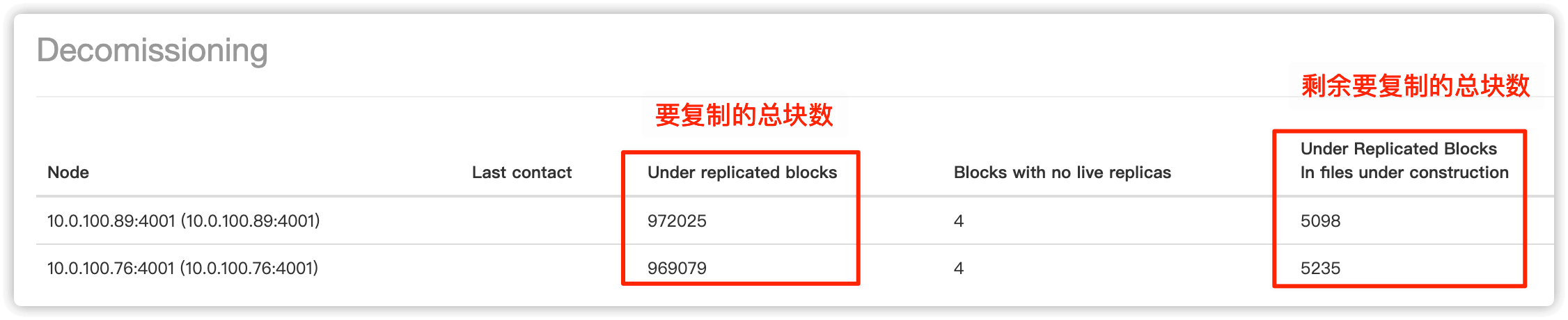
打开 HDFS 原生 web UI,在 Datanodes 页面可以看到想要下线的节点状态变为 Decommission In Progress, 说明这些节点的数据块正在被复制到其他节点,等待所有数据块被复制完成,这些节点状态就会变为 Decommissioned
在最下边可以查看数据复制进度
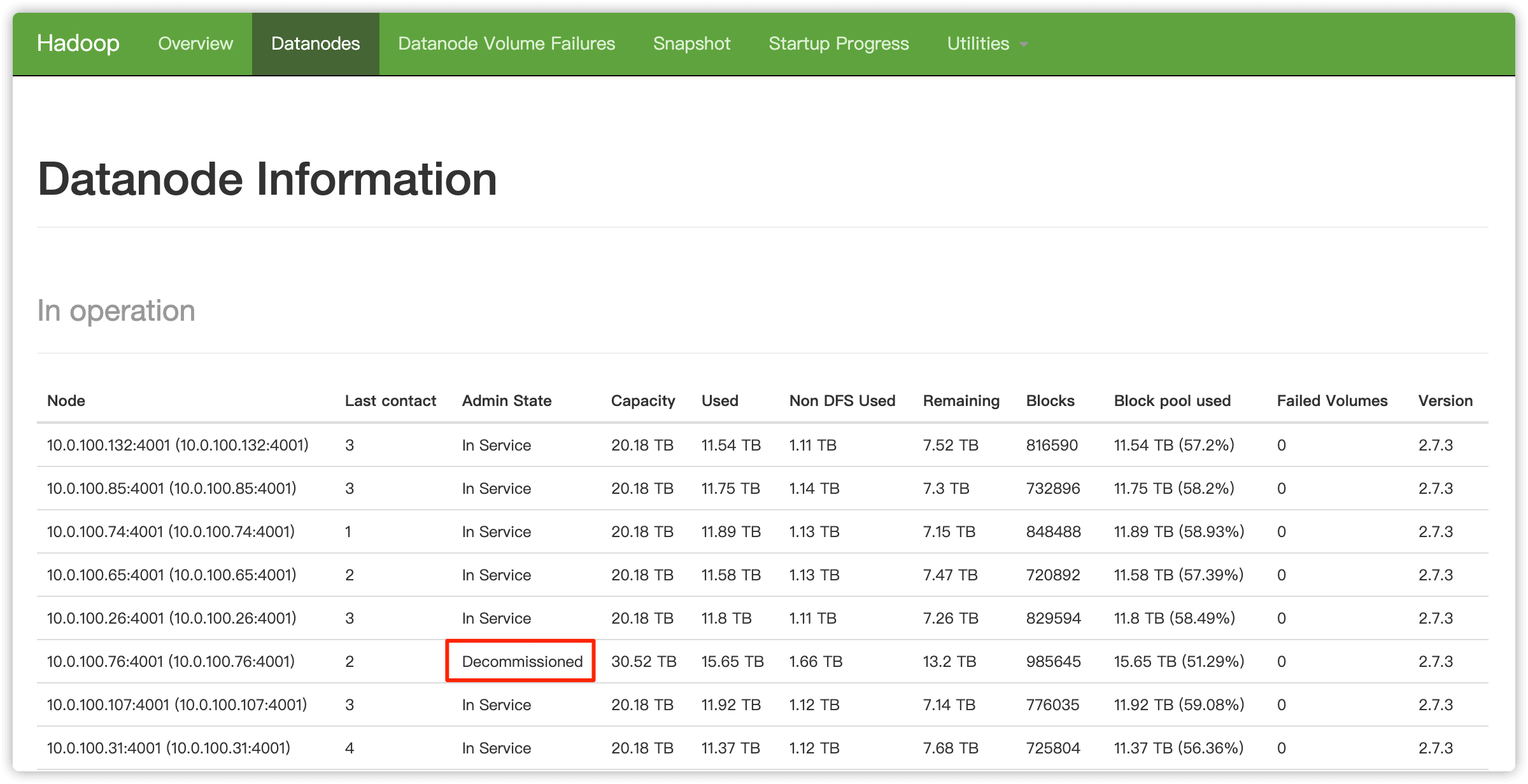
所有数据块被复制完成后,要下线节点的状态就由 Decommissioned in Progress 变成 Decommissioned
2.4 在 emr 控制台停止如上 2 个节点的 DataNode 服务
一定要等2.3步骤中执行完成,即想要下线的节点状态变为 Decommission 才可以继续后续操作
在集群服务HDFS选项中,找到要下线的 DataNode 节点,选中,然后点击 暂停
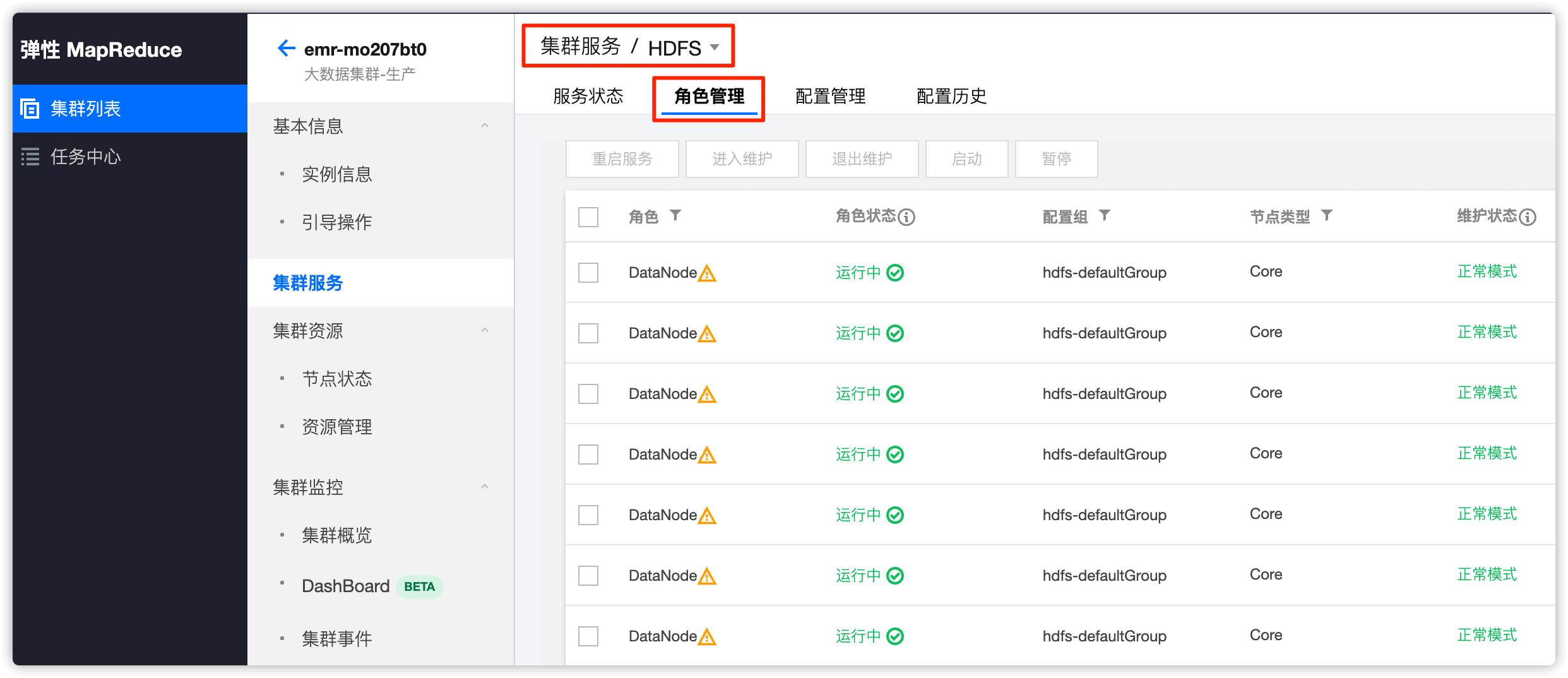
分别选中两个要下线的 DataNode 节点,依次暂停
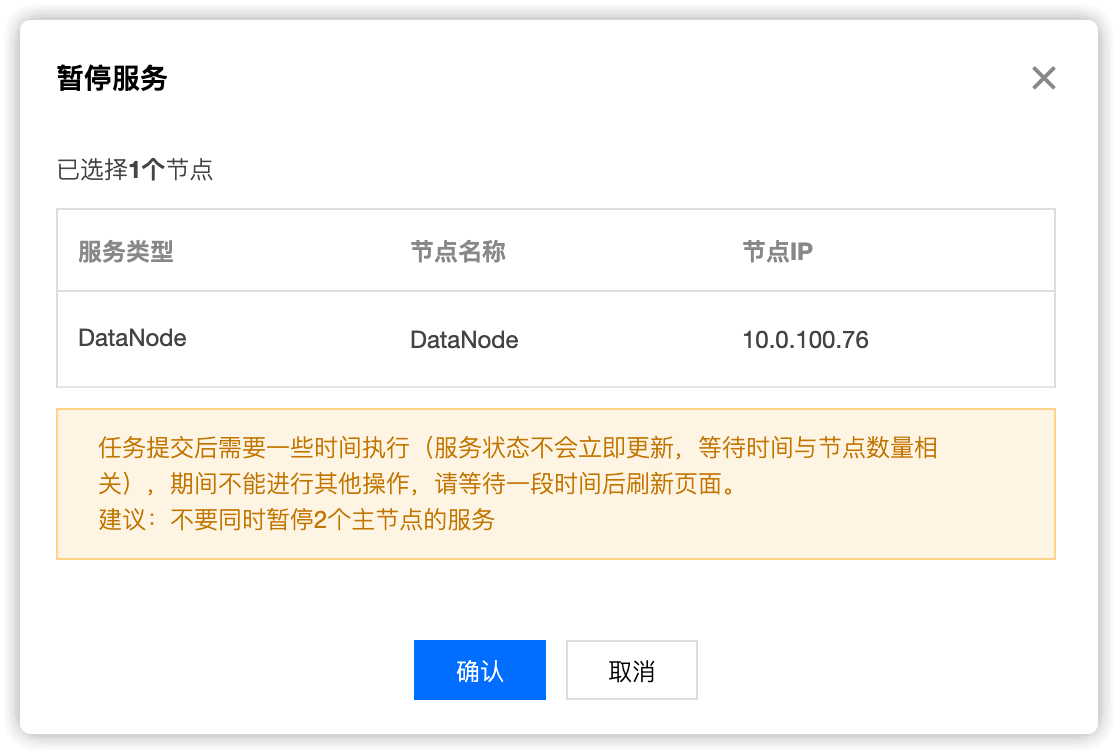
暂停中的 DataNode,模式为 维护模式

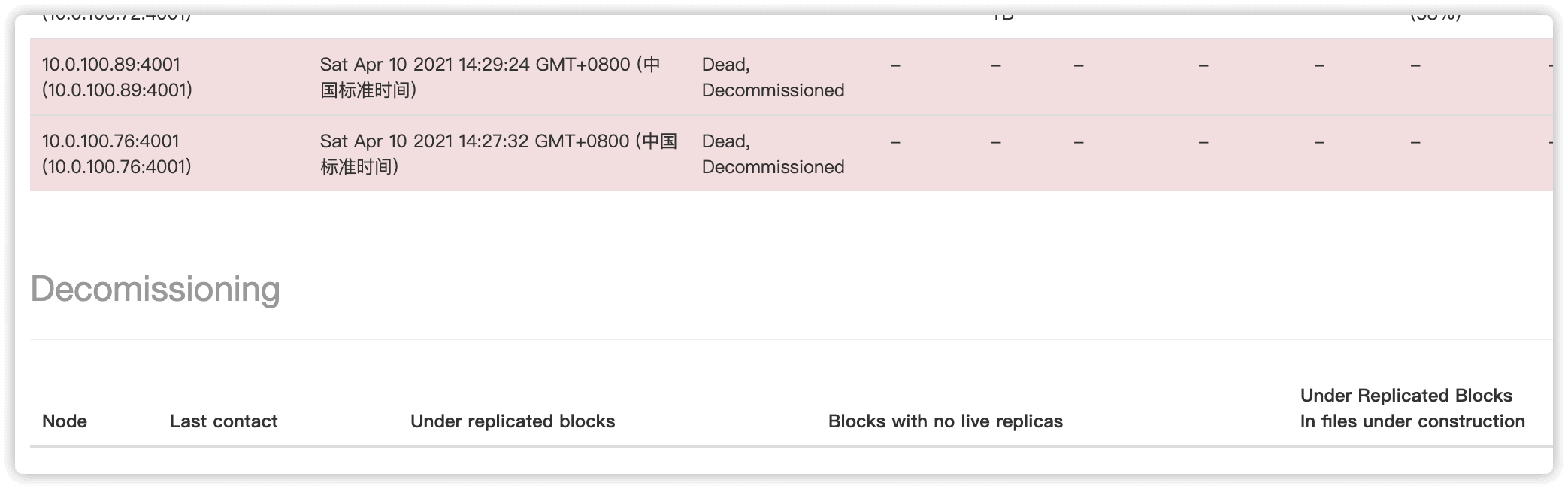
两个 DataNode 节点暂停后,在HDFS web UI 中就可以看到两个节点的状态变为了Dead, Decommissioned
2.5 编辑配置文件,删除要下线机器的IP
第一个文件
在2.1步骤中,我们编辑了Active NameNode节点的 /usr/local/service/hadoop/etc/hadoop/hdfsexcludedhosts 填写想要下线的节点 IP ,现在把这个文件中的ip删除
第二个文件
/usr/local/service/hadoop/etc/hadoop/hdfshosts (两个 NameNode 节点都删除下线 ip)
2.6 两个 NameNode 节点都执行 hadoop dfsadmin -refreshNodes
$ su hadoop -c "hadoop dfsadmin -refreshNodes"
DEPRECATED: Use of this script to execute hdfs command is deprecated.
Instead use the hdfs command for it.

SLF4J: Class path contains multiple SLF4J bindings.
SLF4J: Found binding in [jar:file:/usr/local/service/hadoop/share/hadoop/common/lib/slf4j-log4j12-1.7.10.jar!/org/slf4j/impl/StaticLoggerBinder.class]
SLF4J: Found binding in [jar:file:/usr/local/service/tez/lib/slf4j-log4j12-1.7.10.jar!/org/slf4j/impl/StaticLoggerBinder.class]
SLF4J: See http://www.slf4j.org/codes.html#multiple_bindings for an explanation.
SLF4J: Actual binding is of type [org.slf4j.impl.Log4jLoggerFactory]
Refresh nodes successful for /10.0.100.17:4007
Refresh nodes successful for /10.0.100.11:4007
执行完成后,在HDFS中要下线的NameNode就没了,之前在emr控制台中暂停的2个NameNode状态如下
HDFS 原生 web UI 将不再存在以上两节点,至此 DataNode 下线完毕!
第三步、NodeManager 下线操作
DataNode 下线完后操作
3.1 两个主备 ResourceManager 节点操作
生产中我们的 ResourceManager 服务运行在2个 NameNode 节点上
编辑 /usr/local/service/hadoop/etc/hadoop/yarnexcludedhosts 填写想要下线的节点 IP
vim /usr/local/service/hadoop/etc/hadoop/yarnexcludedhosts
3.2 两个主备ResourceManager 节点都执行 yarn rmadmin -refreshNodes
$ su hadoop -c "yarn rmadmin -refreshNodes"
SLF4J: Class path contains multiple SLF4J bindings.
SLF4J: Found binding in [jar:file:/usr/local/service/hadoop/share/hadoop/common/lib/slf4j-log4j12-1.7.10.jar!/org/slf4j/impl/StaticLoggerBinder.class]
SLF4J: Found binding in [jar:file:/usr/local/service/tez/lib/slf4j-log4j12-1.7.10.jar!/org/slf4j/impl/StaticLoggerBinder.class]
SLF4J: See http://www.slf4j.org/codes.html#multiple_bindings for an explanation.
SLF4J: Actual binding is of type [org.slf4j.impl.Log4jLoggerFactory]
3.3 打开 YARN 原生 web UI
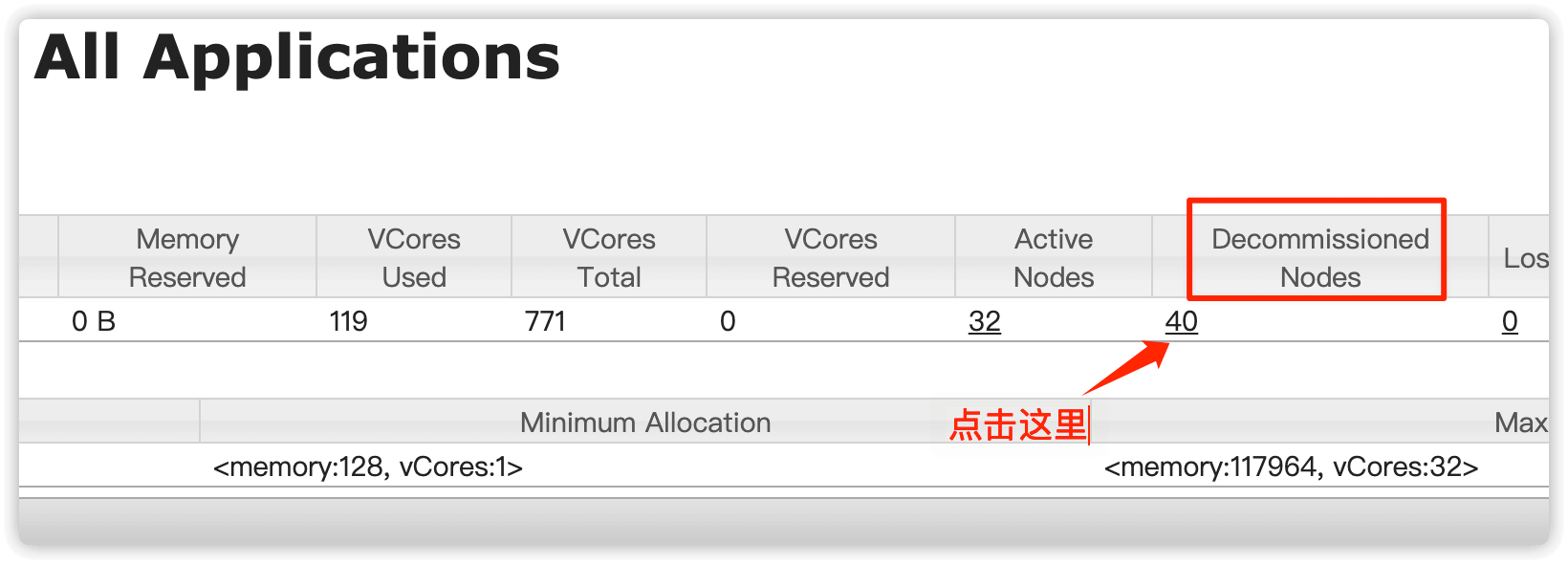
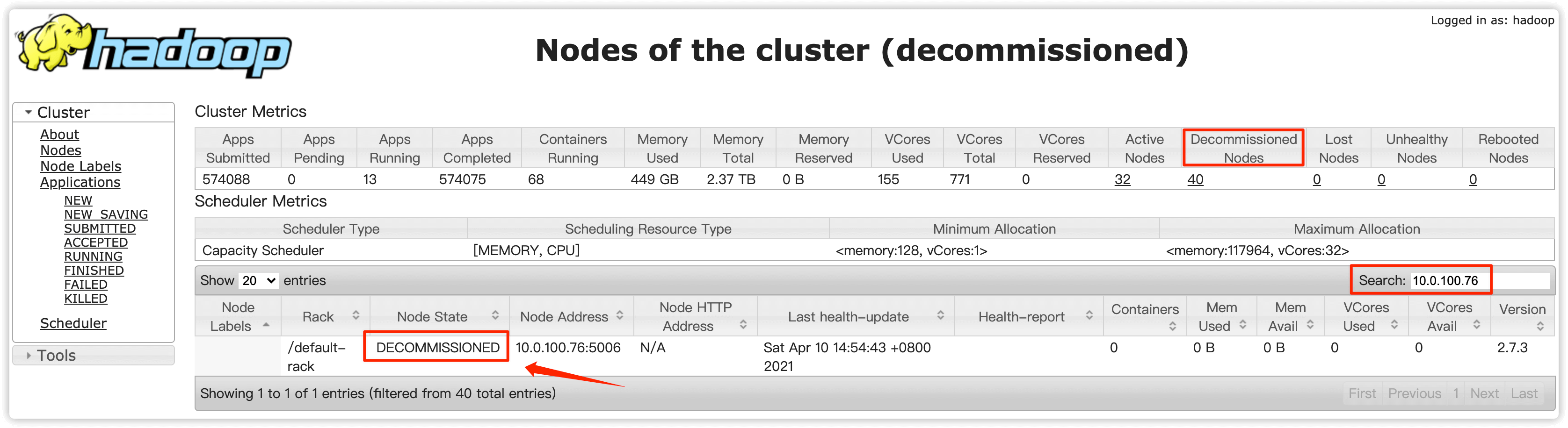
直到 Decommisioned Nodes 处出现下线的节点,说明这些节点已完成任务或本身无任务状态,这些节点状态就会变为 Decommissioned
在 Decommisioned Nodes(退役节点) 处点击下方的对应的数字
搜索要下线节点的IP,如果出现要下线的节点IP则说明这个节点目前已经处于退役状态
3.4 在 emr 控制台停掉如上 2 个节点的 NodeManager 服务
在集群服务中点击 YARN
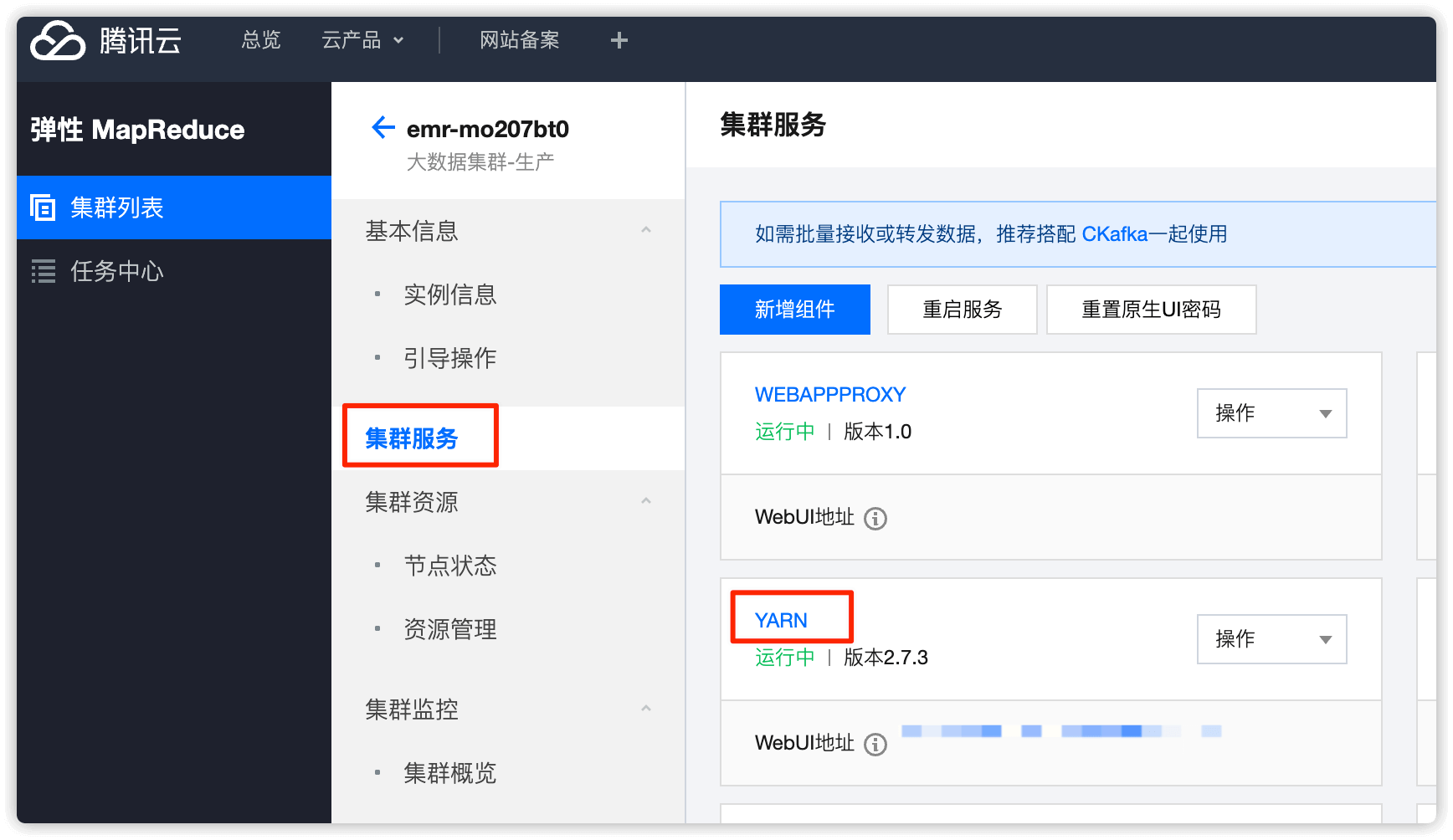
角色处选择 NodeManager,找到要下线的节点,选择并 暂停
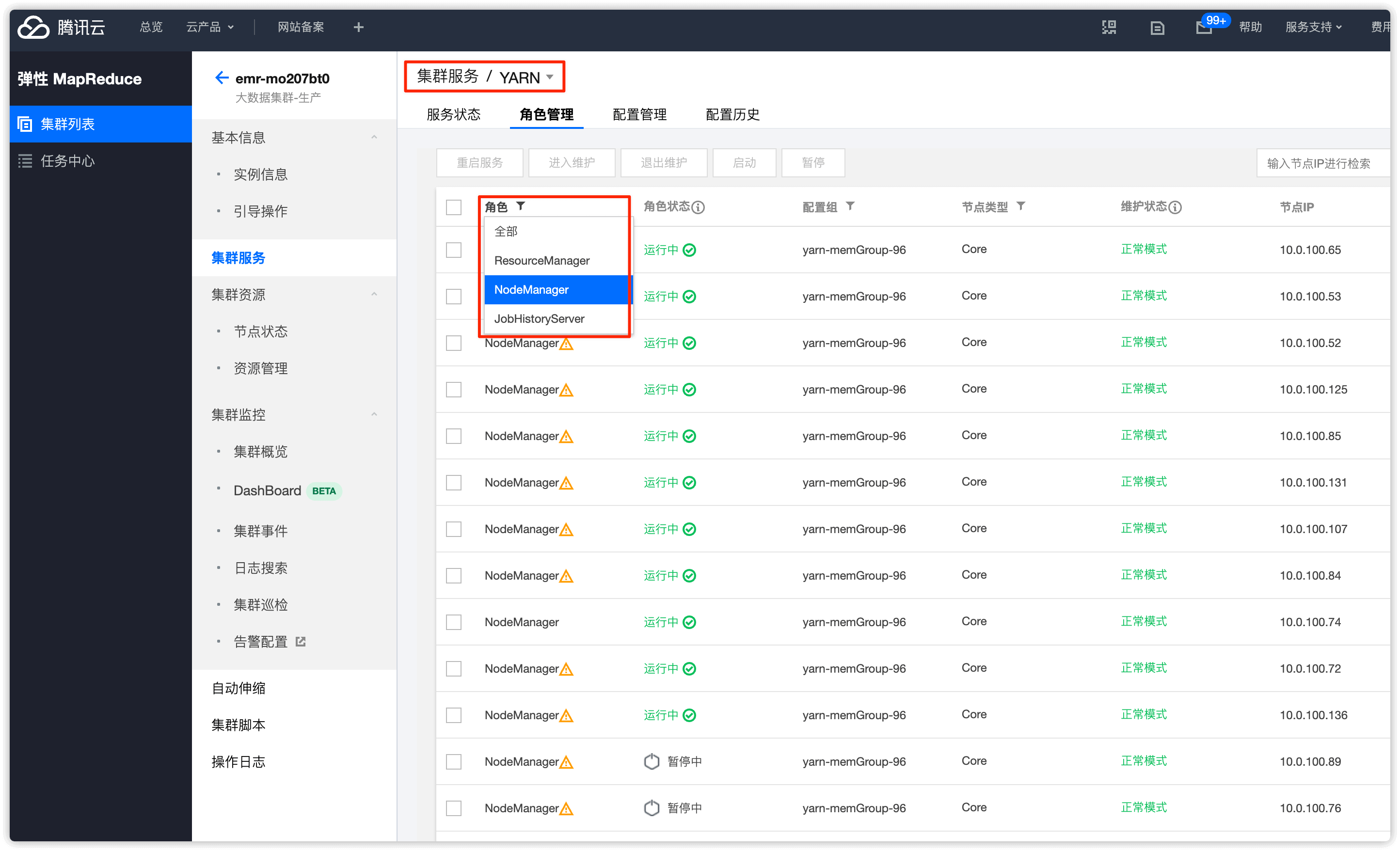
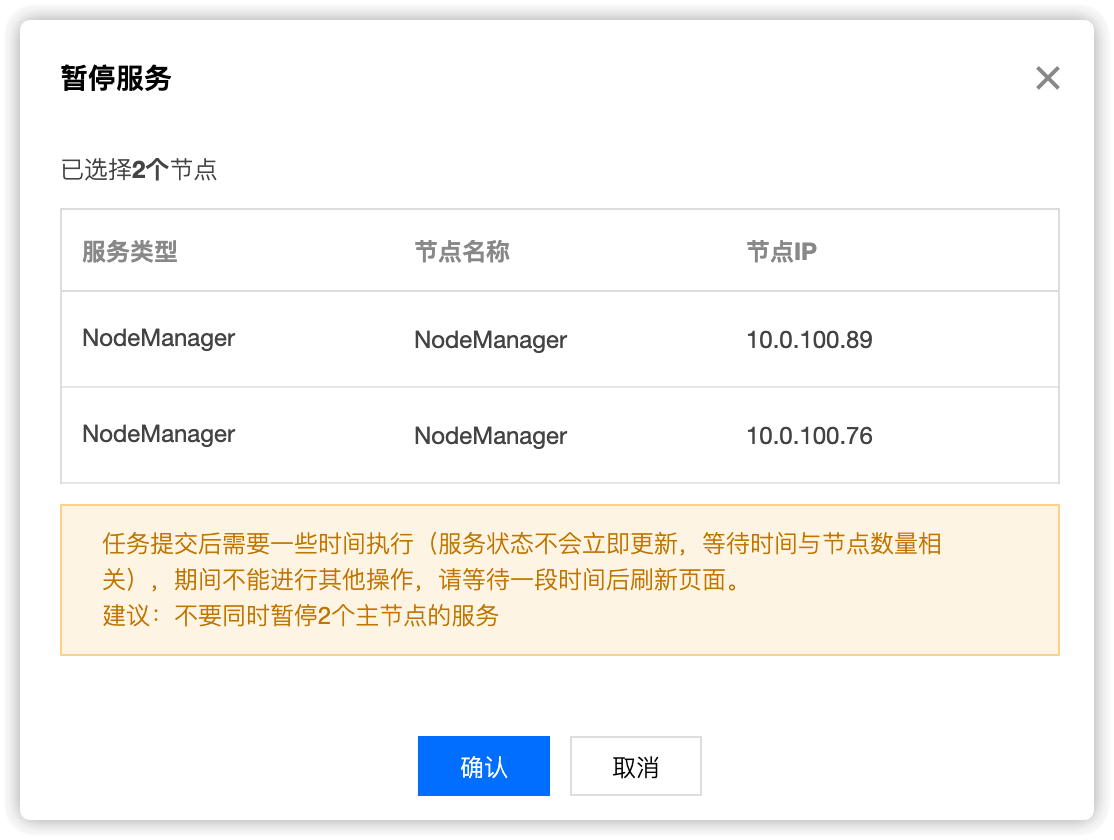
暂停完成后,节点维护状态就会变为 维护模式

3.5 两个主备 ResourceManager 节点编辑两个文件,删除要下线的2个节点的 ip
/usr/local/service/hadoop/etc/hadoop/yarnexcludedhosts
/usr/local/service/hadoop/etc/hadoop/yarnhosts
vim /usr/local/service/hadoop/etc/hadoop/yarnexcludedhosts
vim /usr/local/service/hadoop/etc/hadoop/yarnhosts
3.6 两个主备 ResourceManager 节点重新执行 yarn rmadmin -refreshNodes
$ su hadoop -c "yarn rmadmin -refreshNodes"
SLF4J: Class path contains multiple SLF4J bindings.
SLF4J: Found binding in [jar:file:/usr/local/service/hadoop/share/hadoop/common/lib/slf4j-log4j12-1.7.10.jar!/org/slf4j/impl/StaticLoggerBinder.class]
SLF4J: Found binding in [jar:file:/usr/local/service/tez/lib/slf4j-log4j12-1.7.10.jar!/org/slf4j/impl/StaticLoggerBinder.class]
SLF4J: See http://www.slf4j.org/codes.html#multiple_bindings for an explanation.
SLF4J: Actual binding is of type [org.slf4j.impl.Log4jLoggerFactory]
YARN 原生 web UI 将不再存在以上两节点(腾讯云给的文档中说此步骤操作后,YARN 原生 web UI中不存在以上两个节点,但是实际上是存在的,经与腾讯云沟通后对方说存在也不影响),至此 Nodemanager 下线完毕
对于 NodeManager 下线,emr-V1.3.1 版本需重启两个 ResourceManager 后,WEB 页面才剔除节点, 但实际影响不大。在执行完步骤 3.6 后,下线节点的 NodeManager 实际已从集群中移除,任务不会再分配到该下线的 NodeManmager 节点
第四步、RegionServer 下线操作
若存在 HBASE,请将 DataNode 下线完成后操作
4.1 登录 EMR 控制台,将下线节点的 RegionServer 进入维护模式
HBASE 中分为
HMaster和RegionServer两个角色
在集群列表中选择 HBASE
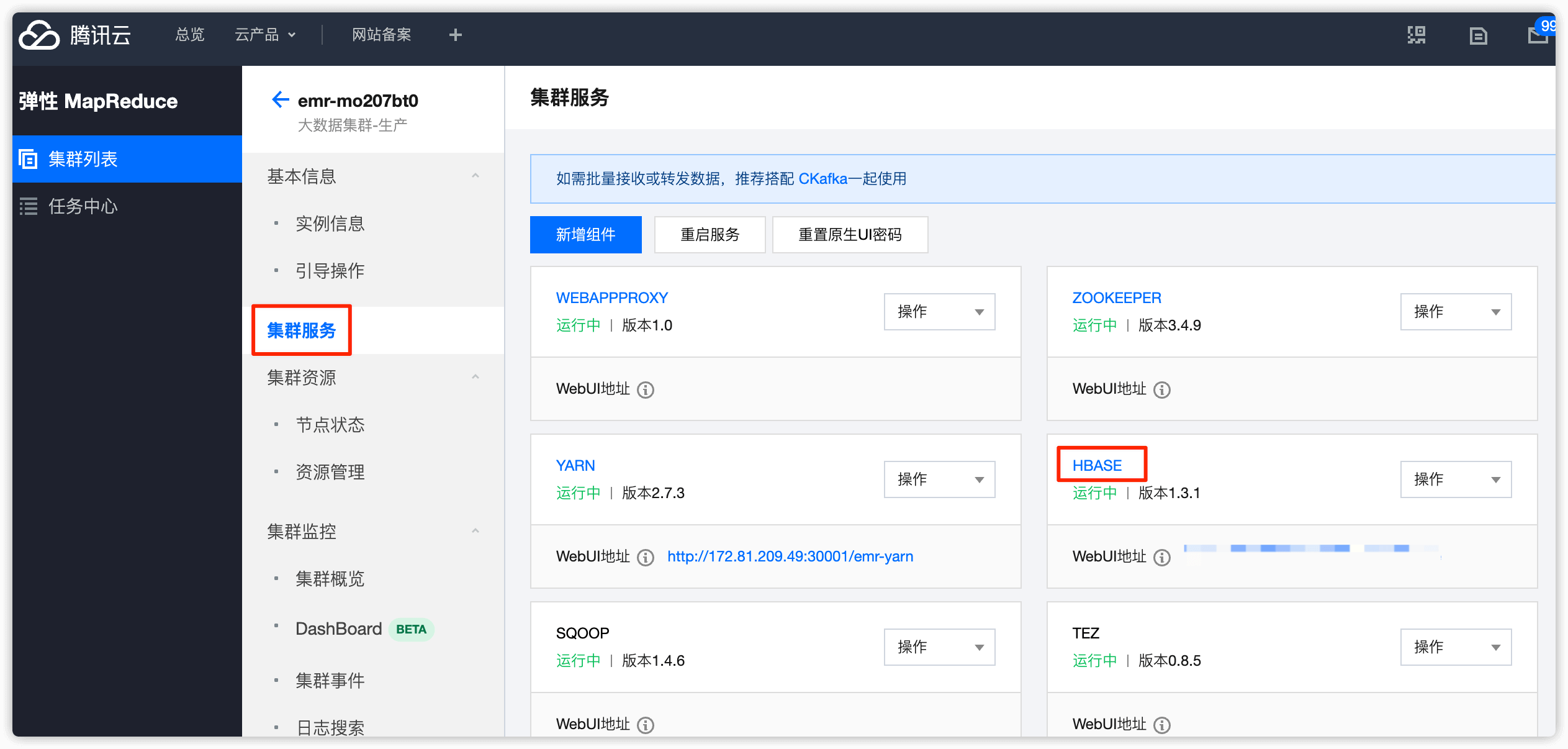
角色选择 RegionServer
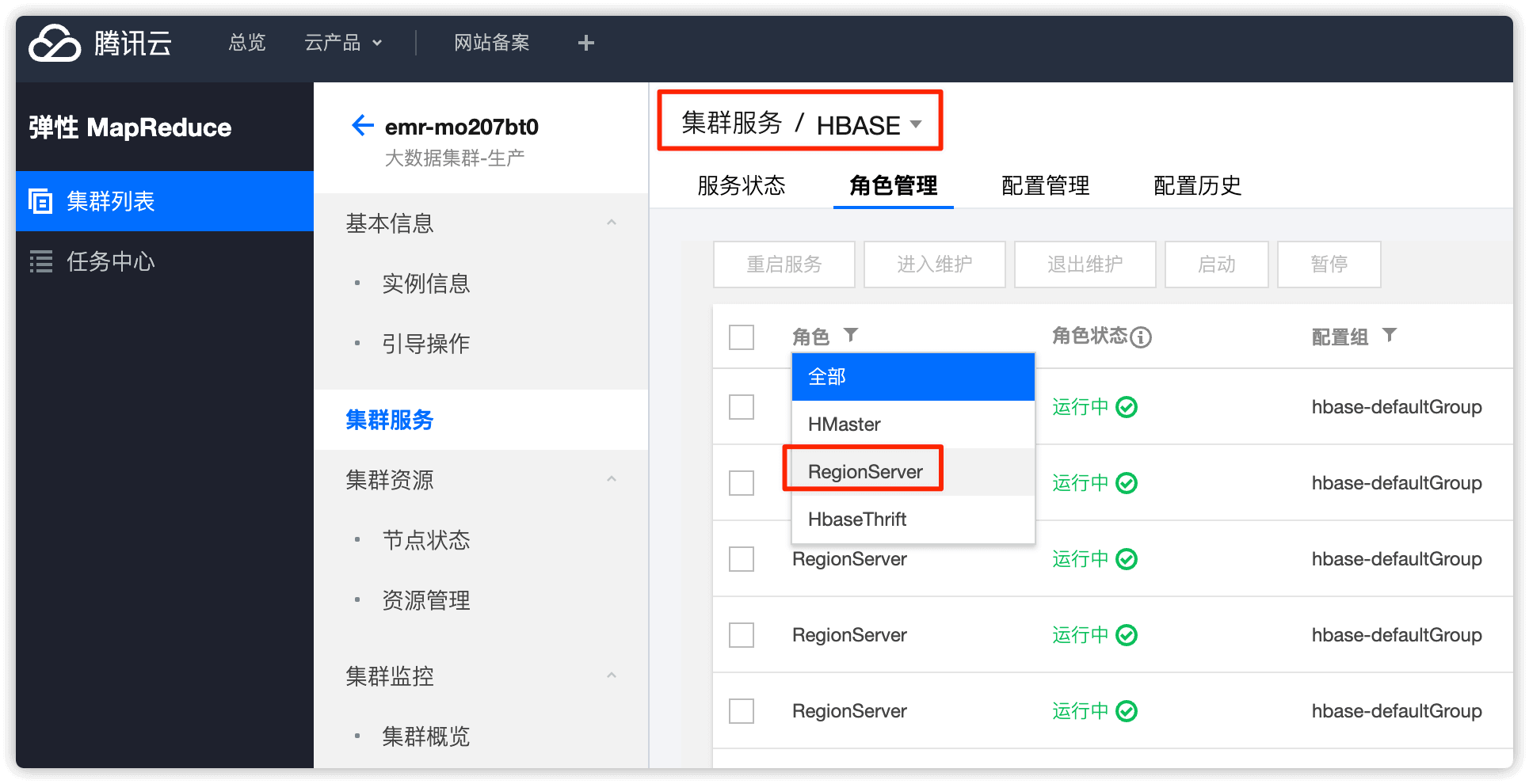
选择要下线的 RegionServer 节点,设置状态为 暂停
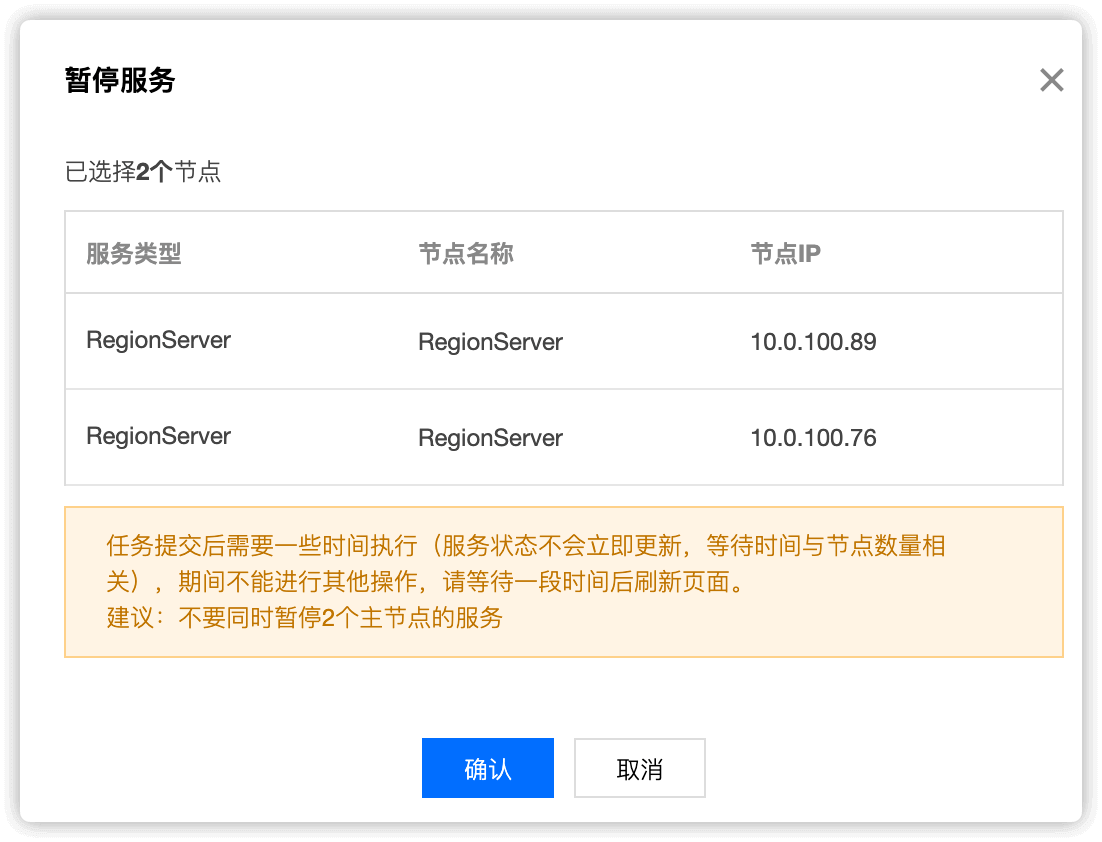
点击暂停后稍等一会,节点的状态就变为了暂停中,维护状态就变为了 维护模式

在HBASE web UI 中可以看到 RegionServer 的状态变为了 Dead
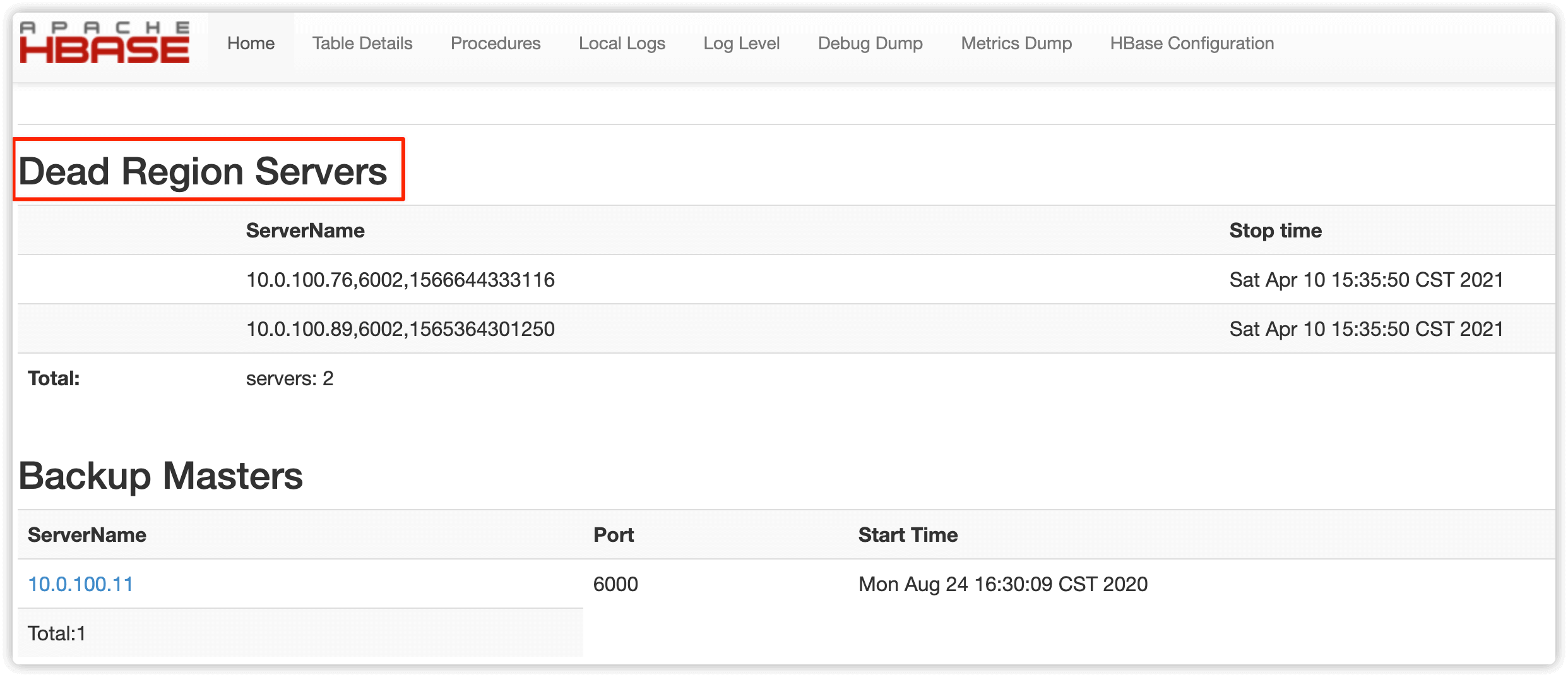
4.2 登录到对应下线机器,执行如下命令
su hadoop -c "/usr/local/service/hbase/bin/graceful_stop.sh IP"
su hadoop -c "/usr/local/service/hbase/bin/graceful_stop.sh 10.0.100.76
su hadoop -c "/usr/local/service/hbase/bin/graceful_stop.sh 10.0.100.89
下线的节点1
$ su hadoop -c "/usr/local/service/hbase/bin/graceful_stop.sh 10.0.100.76"
2021-04-10T15:41:57 Disabling load balancer
SLF4J: Class path contains multiple SLF4J bindings.
SLF4J: Found binding in [jar:file:/usr/local/service/hbase/lib/slf4j-log4j12-1.7.10.jar!/org/slf4j/impl/StaticLoggerBinder.class]
SLF4J: Found binding in [jar:file:/usr/local/service/hadoop/share/hadoop/common/lib/slf4j-log4j12-1.7.10.jar!/org/slf4j/impl/StaticLoggerBinder.class]
SLF4J: Found binding in [jar:file:/usr/local/service/tez/lib/slf4j-log4j12-1.7.10.jar!/org/slf4j/impl/StaticLoggerBinder.class]
SLF4J: See http://www.slf4j.org/codes.html#multiple_bindings for an explanation.
SLF4J: Actual binding is of type [org.slf4j.impl.Log4jLoggerFactory]
2021-04-10T15:42:06 Previous balancer state was true
2021-04-10T15:42:06 Unloading 10.0.100.76 region(s)
SLF4J: Class path contains multiple SLF4J bindings.
SLF4J: Found binding in [jar:file:/usr/local/service/hbase/lib/slf4j-log4j12-1.7.10.jar!/org/slf4j/impl/StaticLoggerBinder.class]
SLF4J: Found binding in [jar:file:/usr/local/service/hadoop/share/hadoop/common/lib/slf4j-log4j12-1.7.10.jar!/org/slf4j/impl/StaticLoggerBinder.class]
SLF4J: Found binding in [jar:file:/usr/local/service/tez/lib/slf4j-log4j12-1.7.10.jar!/org/slf4j/impl/StaticLoggerBinder.class]
SLF4J: See http://www.slf4j.org/codes.html#multiple_bindings for an explanation.
SLF4J: Actual binding is of type [org.slf4j.impl.Log4jLoggerFactory]
RuntimeError: Server 10.0.100.76:6002 not online
    stripServer at /usr/local/service/hbase/bin/region_mover.rb:194
  unloadRegions at /usr/local/service/hbase/bin/region_mover.rb:305
         (root) at /usr/local/service/hbase/bin/region_mover.rb:488
2021-04-10T15:42:14 Unloaded 10.0.100.76 region(s)
2021-04-10T15:42:14 Stopping regionserver on 10.0.100.76
no regionserver to stop because no pid file /data/emr/hbase/pid/hbase-hadoop-regionserver.pid
2021-04-10T15:42:14 Restoring balancer state to true
下线的节点2
$ su hadoop -c "/usr/local/service/hbase/bin/graceful_stop.sh 10.0.100.89"
2021-04-10T15:46:25 Disabling load balancer
SLF4J: Class path contains multiple SLF4J bindings.
SLF4J: Found binding in [jar:file:/usr/local/service/hbase/lib/slf4j-log4j12-1.7.10.jar!/org/slf4j/impl/StaticLoggerBinder.class]
SLF4J: Found binding in [jar:file:/usr/local/service/hadoop/share/hadoop/common/lib/slf4j-log4j12-1.7.10.jar!/org/slf4j/impl/StaticLoggerBinder.class]
SLF4J: Found binding in [jar:file:/usr/local/service/tez/lib/slf4j-log4j12-1.7.10.jar!/org/slf4j/impl/StaticLoggerBinder.class]
SLF4J: See http://www.slf4j.org/codes.html#multiple_bindings for an explanation.
SLF4J: Actual binding is of type [org.slf4j.impl.Log4jLoggerFactory]
2021-04-10T15:46:35 Previous balancer state was true
2021-04-10T15:46:35 Unloading 10.0.100.89 region(s)
SLF4J: Class path contains multiple SLF4J bindings.
SLF4J: Found binding in [jar:file:/usr/local/service/hbase/lib/slf4j-log4j12-1.7.10.jar!/org/slf4j/impl/StaticLoggerBinder.class]
SLF4J: Found binding in [jar:file:/usr/local/service/hadoop/share/hadoop/common/lib/slf4j-log4j12-1.7.10.jar!/org/slf4j/impl/StaticLoggerBinder.class]
SLF4J: Found binding in [jar:file:/usr/local/service/tez/lib/slf4j-log4j12-1.7.10.jar!/org/slf4j/impl/StaticLoggerBinder.class]
SLF4J: See http://www.slf4j.org/codes.html#multiple_bindings for an explanation.
SLF4J: Actual binding is of type [org.slf4j.impl.Log4jLoggerFactory]
RuntimeError: Server 10.0.100.89:6002 not online
    stripServer at /usr/local/service/hbase/bin/region_mover.rb:194
  unloadRegions at /usr/local/service/hbase/bin/region_mover.rb:305
         (root) at /usr/local/service/hbase/bin/region_mover.rb:488
2021-04-10T15:46:43 Unloaded 10.0.100.89 region(s)
2021-04-10T15:46:43 Stopping regionserver on 10.0.100.89
no regionserver to stop because no pid file /data/emr/hbase/pid/hbase-hadoop-regionserver.pid
2021-04-10T15:46:43 Restoring balancer state to true
报错可以忽略
HBASE 原生web UI 查看下线节点 region 为0即代表 RegionServer 下线完毕
4.3 控制台下线 core节点操作
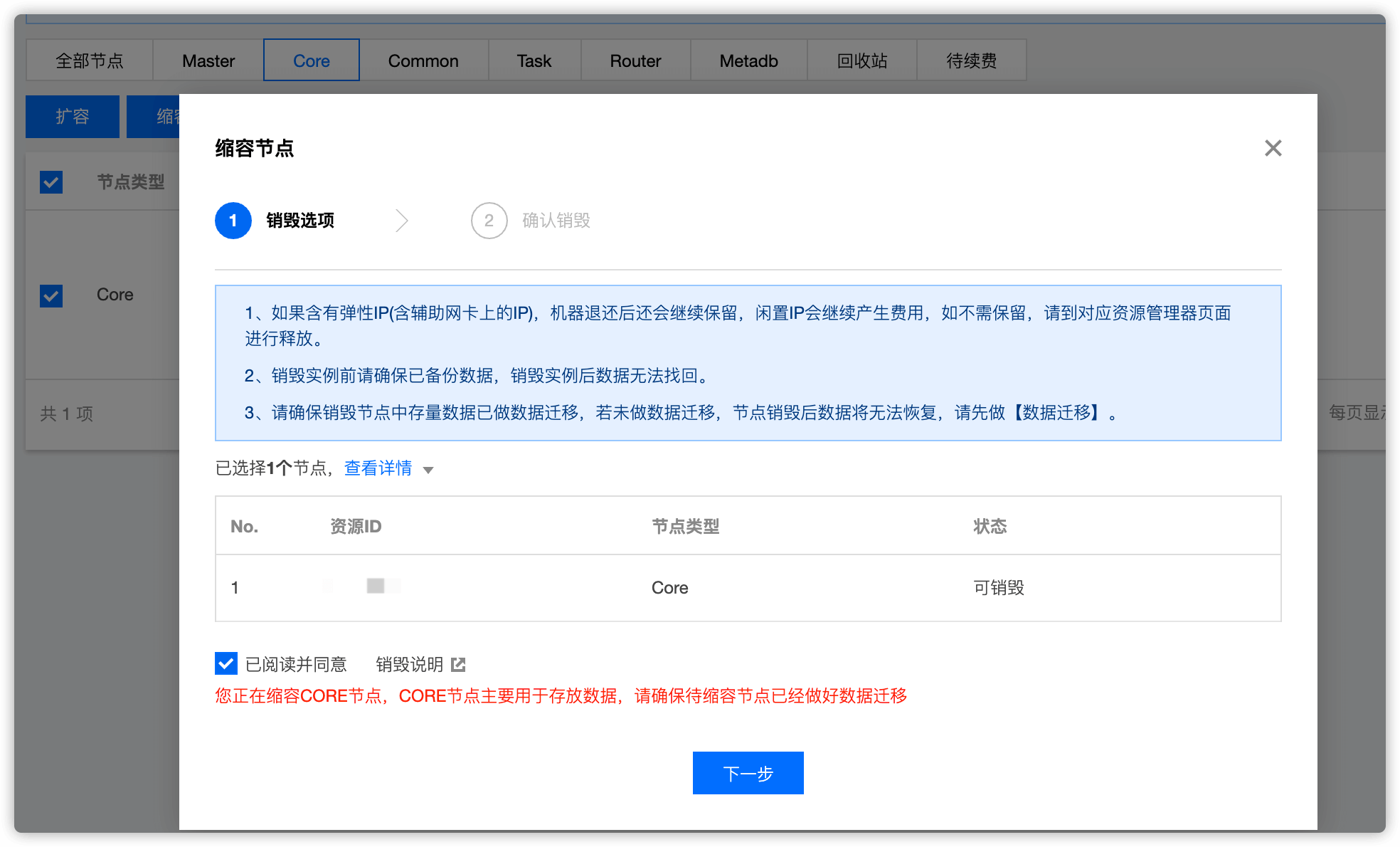
在控制台 集群资源 -> 资源管理 选择 Core,找到要下线的节点,点击 缩容 即可
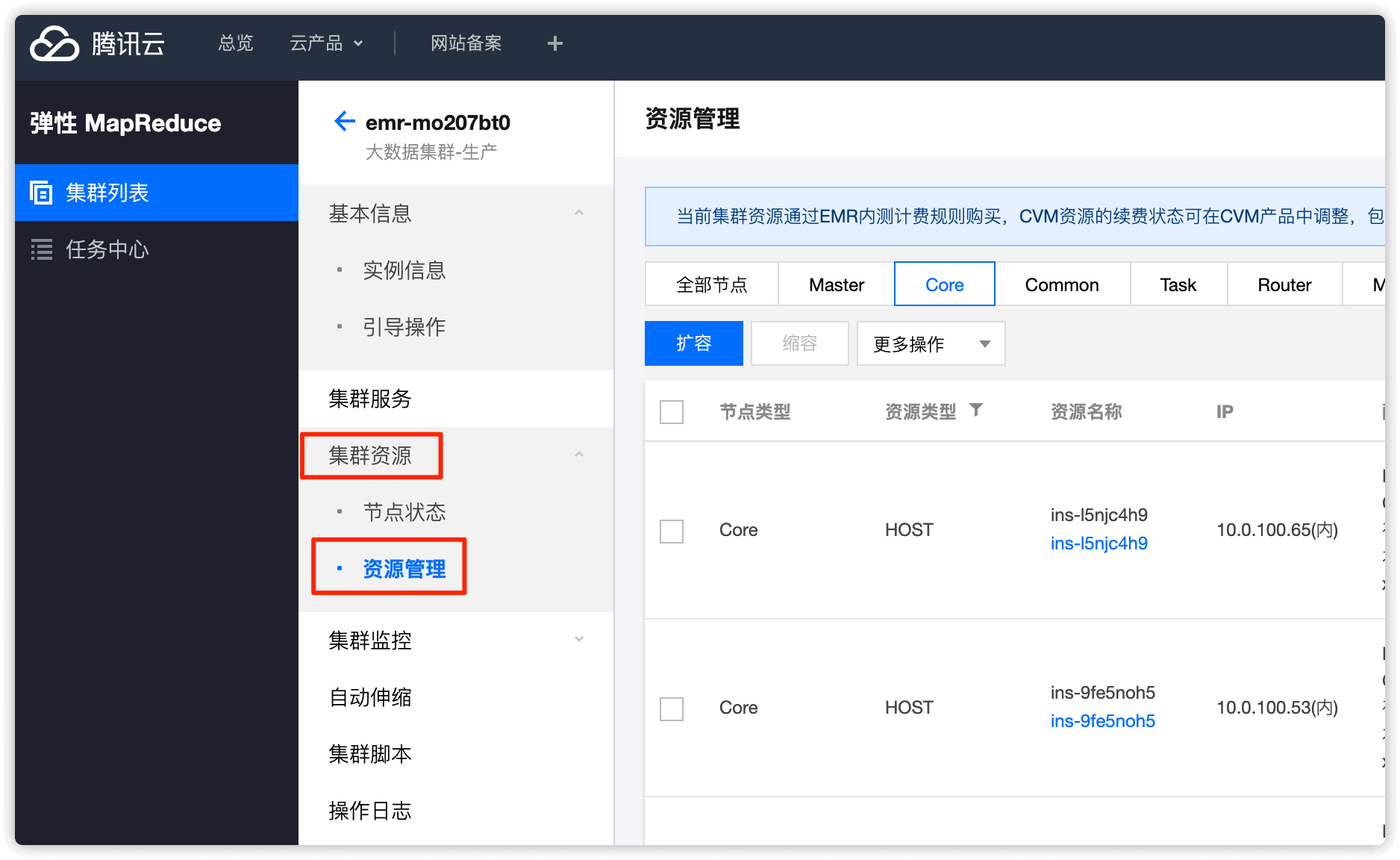
勾选 已阅读并同意,然后点击 下一步
点击 开始销毁
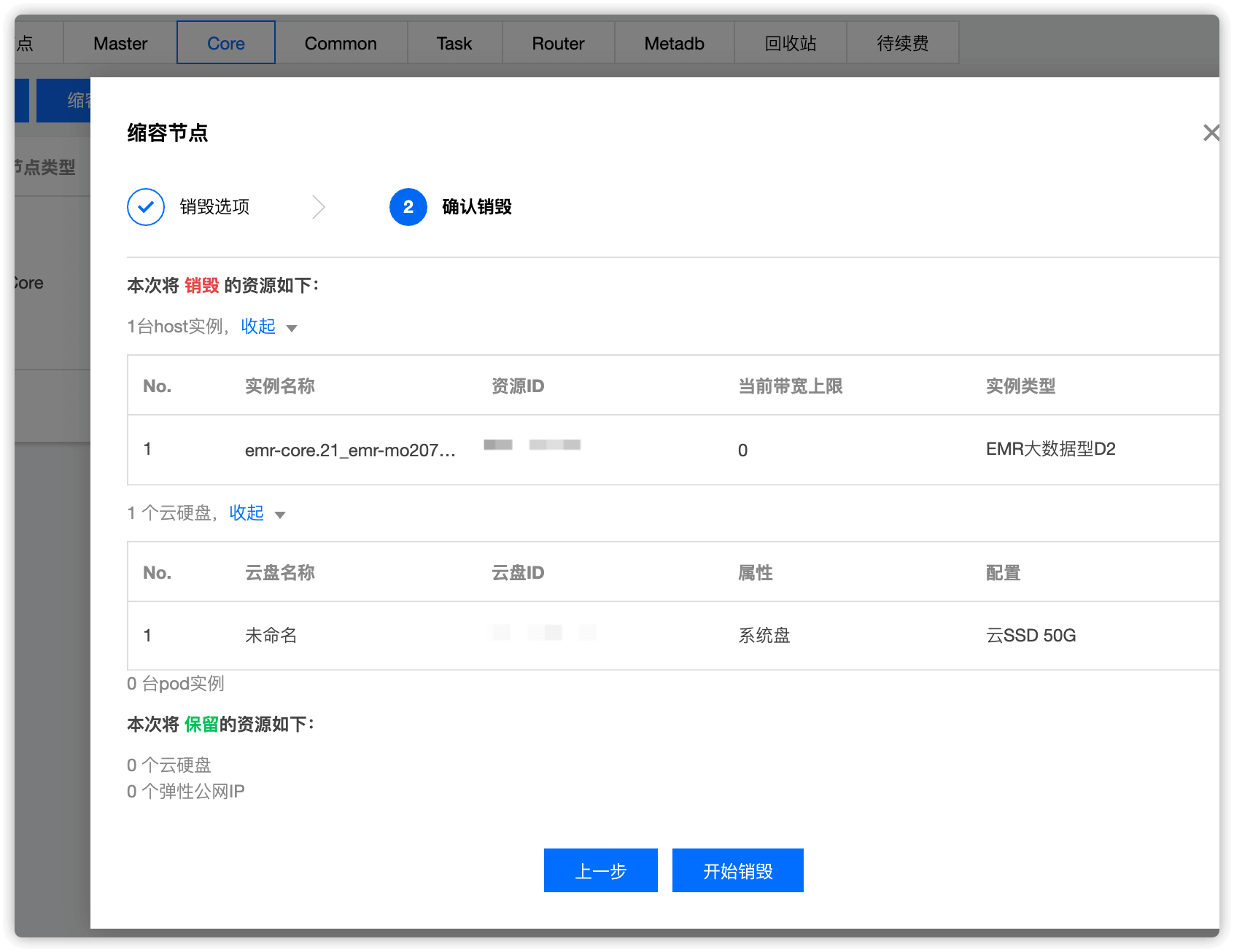
至此,core节点下线就完成了!