git命令总结
[toc]
1.git简介
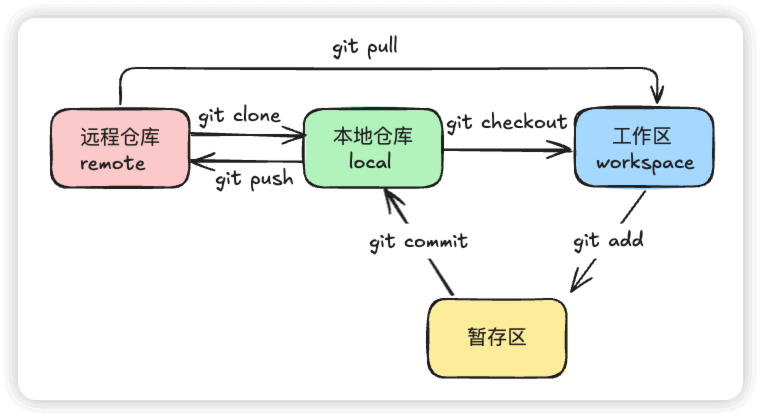
1.1 git工作流程
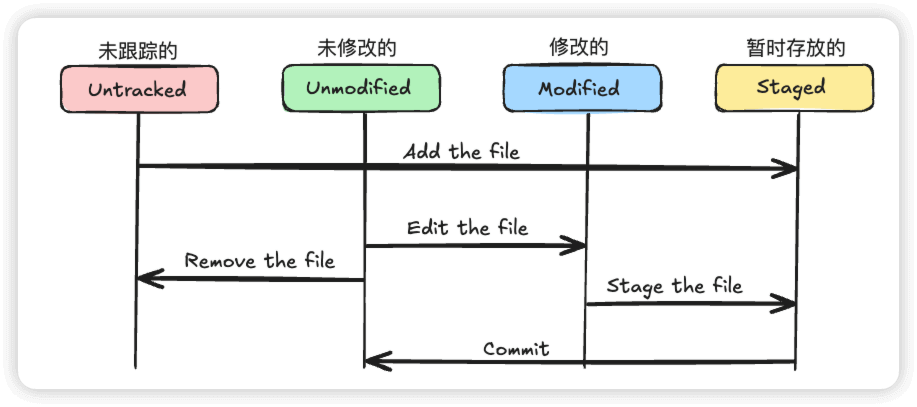
1.2 git四种状态
2.git命令总结
2.1 git工作区域及文件颜色
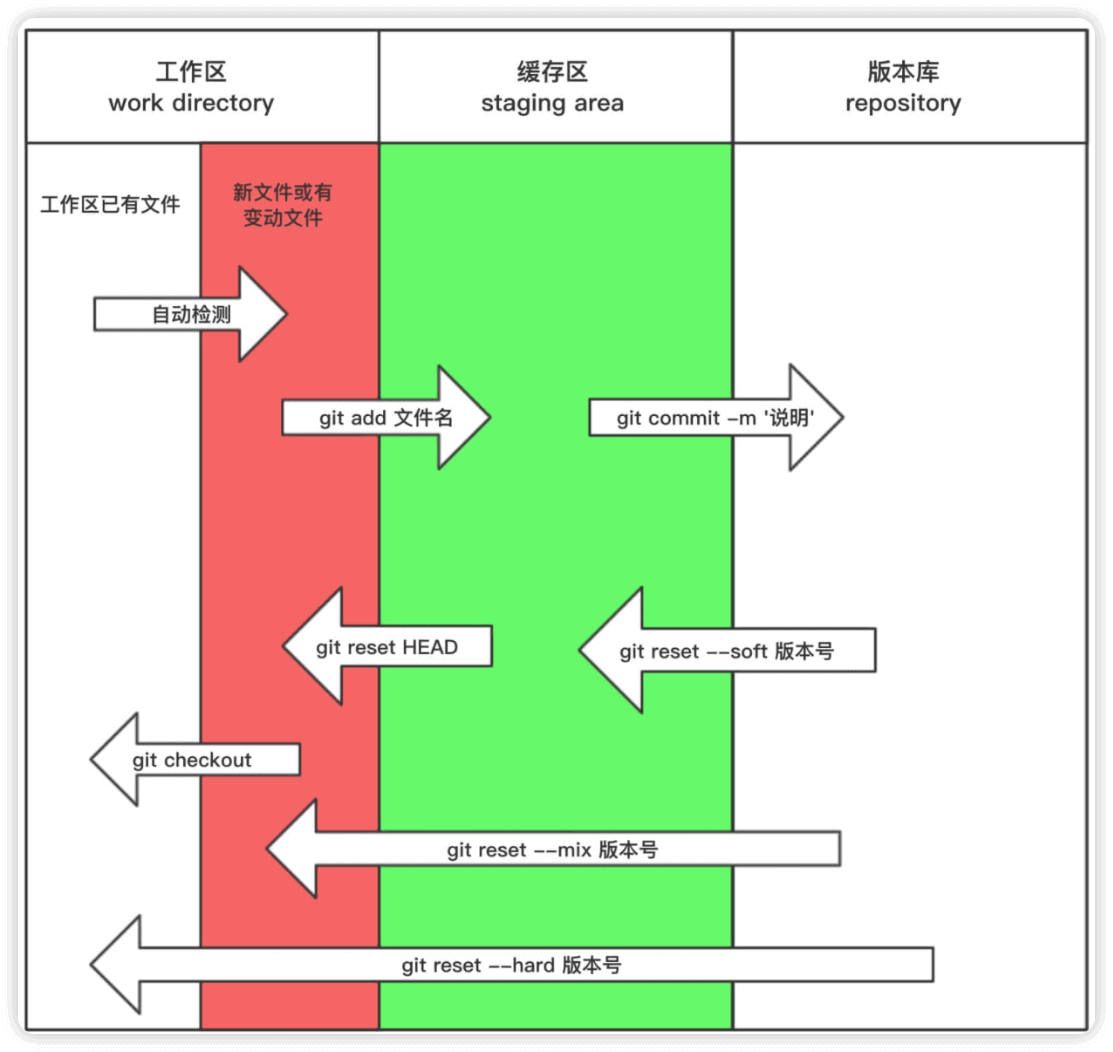
git status 文件三种颜色的变化
红色- 新增文件或者修改的旧文件-->执行命令
git add .或者git add 文件名
- git已经管理起来的文件-->执行命令
git commit -m '描述信息'
白色
- 已经生成版本的文件
2.2 git提交数据
创建文件
$ touch aaa bbb
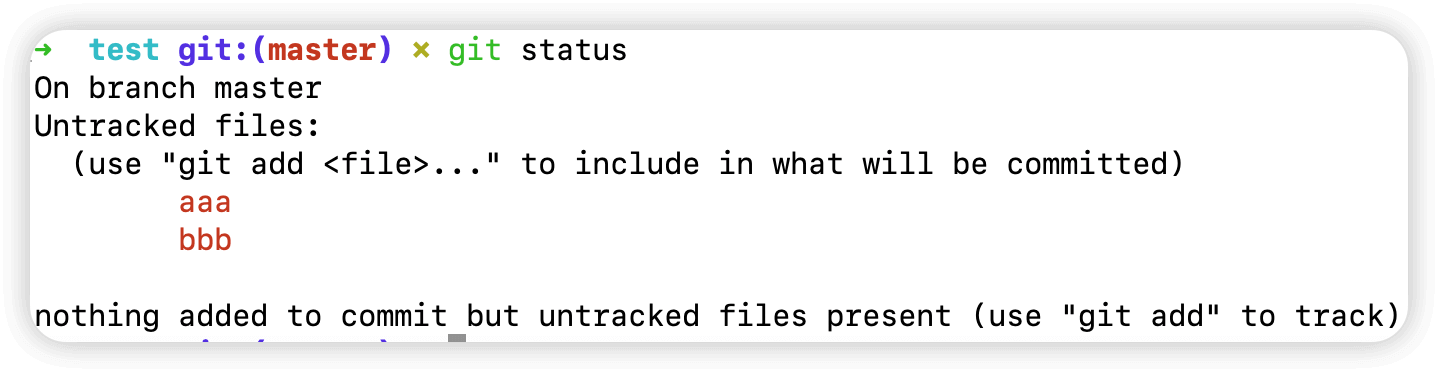
查看git文件状态(此时文件是红色的,属于新增文件)
$ git status
On branch master
Untracked files:
  (use "git add <file>..." to include in what will be committed)
	aaa
	bbb

nothing added to commit but untracked files present (use "git add" to track)
提交文件至暂存区
$ git add .
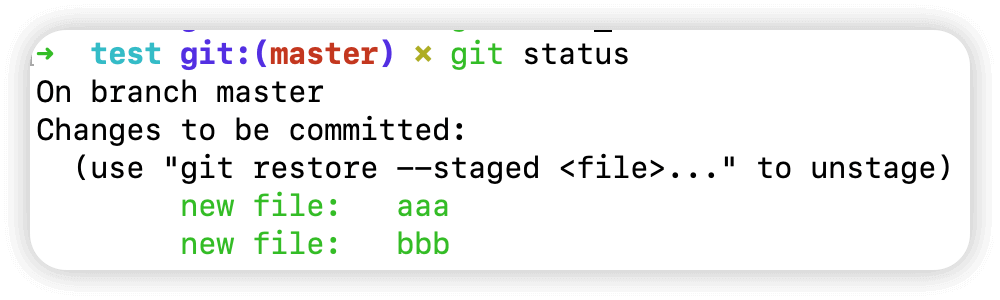
此时再查看文件,文件是绿色的,已被git管理起来
$ git status
On branch master
Changes to be committed:
  (use "git restore --staged <file>..." to unstage)
	new file:   aaa
	new file:   bbb
2.3 git删除数据
2.3.1 git删除暂存区中的文件 git rm --cached
git删除暂存区中的文件
$ git rm --cached aaa bbb
rm 'aaa'
rm 'bbb'
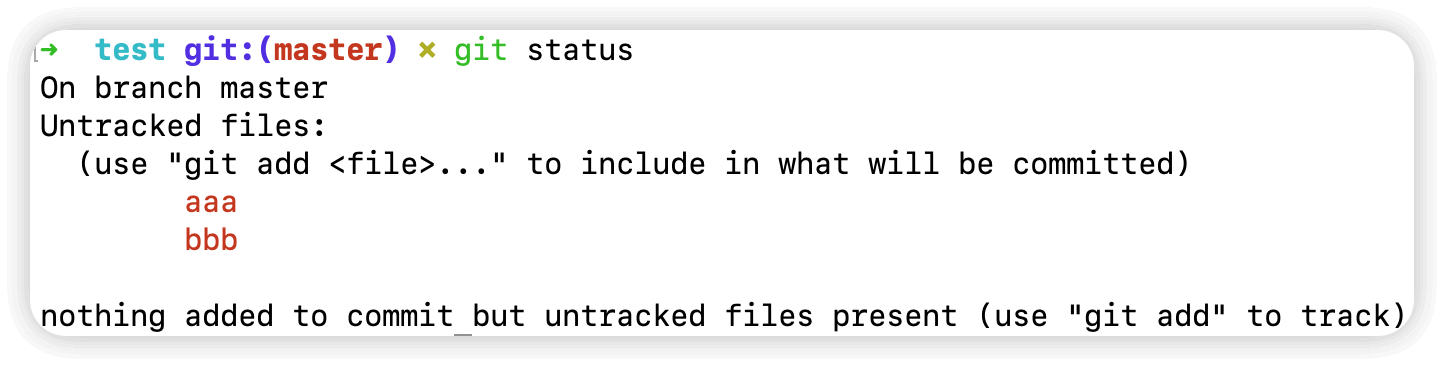
此时文件变回红色
$ git status
On branch master
Untracked files:
  (use "git add <file>..." to include in what will be committed)
	aaa
	bbb

nothing added to commit but untracked files present (use "git add" to track)
2.3.2 git删除工作区和暂存区中的文件 git rm -f 文件名
查看暂存区中的文件,此时是绿色的
$ git status
On branch master
Changes to be committed:
  (use "git restore --staged <file>..." to unstage)
	new file:   aaa
	new file:   bbb
删除工作区的文件同时暂存区中的文件也会同时被删除
$ git rm -f aaa bbb
rm 'aaa'
rm 'bbb'
$ ls
$ git status
On branch master
nothing to commit, working tree clean
2.4 git移动数据
2.4.1 git提交数据至版本库 git commit -m '描述信息'
创建文件
$ touch aaa bbb
提交文件至暂存区
$ git add .
此时文件是绿色的
$ git status
On branch master
Changes to be committed:
  (use "git restore --staged <file>..." to unstage)
	new file:   aaa
	new file:   bbb
提交文件至版本库
$ git commit -m 'touch aaa bbb'
[master 7215e51] touch aaa bbb
 2 files changed, 0 insertions(+), 0 deletions(-)
 create mode 100644 aaa
 create mode 100644 bbb
此时再查看文件暂存区中已经没有了,已经被git管理起来了
$ git status
On branch master
nothing to commit, working tree clean
2.4.2 git移动数据,有时会将已经添加至暂存区的文件重命名 git mv 原文件 新文件
此时文件是绿色的
$ git status
On branch master
Changes to be committed:
  (use "git restore --staged <file>..." to unstage)
	new file:   aaa
	new file:   bbb
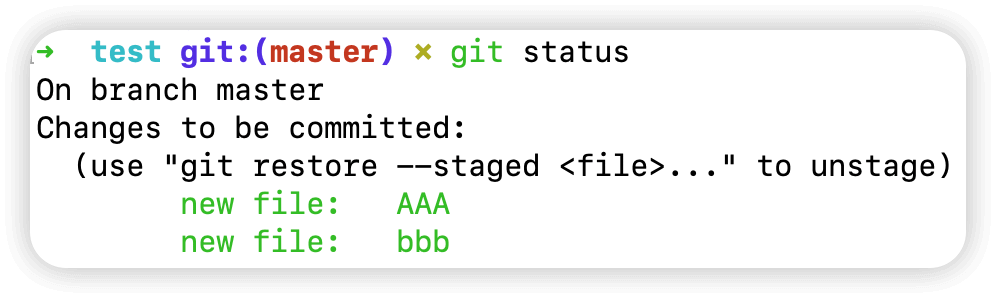
现在想把暂存区中的文件 aaa 修改为 AAA
$ git mv aaa AAA
$ git status
On branch master
Changes to be committed:
  (use "git restore --staged <file>..." to unstage)
	new file:   AAA
	new file:   bbb
提交文件至git版本库
$ git commit -m 'change file aaa->AAA'
[master 7de2d02] change file aaa->AAA
 2 files changed, 0 insertions(+), 0 deletions(-)
 create mode 100644 AAA
 create mode 100644 bbb
2.5 git历史数据
2.5.1 git查看历史数据 git log
往回滚动(返回到上一个提交)
- 按键
k或↑:向上滚动一行 - 按键
b:回到上一页
向下滚动:
- 按键
j或↓:向下滚动一行。 - 按键
Space:向下滚动一页。
退出日志视图:
- 按键
q:退出git log界面
查看全部日志
$ git log
commit 7de2d02e662b1c47cb23085240860bf6a8d0d800 (HEAD -> master)
Author: 什么都不会 <pp@163.com>
Date:   Sun Feb 23 21:10:03 2020 +0800

    change file aaa->AAA

commit b32661c0627eb5cdac793c3e80bcc89f3d40a13d (origin/master)
Author: 什么都不会 <pp@163.com>
Date:   Sun Feb 23 20:00:47 2020 +0800

    清空文件

commit 61acb78adac52288805ab59992e9c260866186f0
Author: 什么都不会 <pp@163.com>
Date:   Sat Feb 22 22:16:24 2020 +0800

    忽略文件测试
.........
指定显示日志个数
$ git log -n 1
commit 7de2d02e662b1c47cb23085240860bf6a8d0d800 (HEAD -> master)
Author: 什么都不会 <pp@163.com>
Date:   Sun Feb 23 21:10:03 2020 +0800

    change file aaa->AAA
2.5.2 git以一行的形式查看日志 git log --oneline
以一行的形式查看
$ git log --oneline
7de2d02 (HEAD -> master) change file aaa->AAA
b32661c (origin/master) 清空文件
61acb78 忽略文件测试
4901535 忽略文件测试
1b7cabd 提交忽略文件
a32513a (bug) master清空测试文件
42f05ec 文件内容就是文件名
d66565f caonima
4ae41d2 提交haha hehe test
c266f9e touch hehe
7e353d7 增加test文件内容
9f30440 touch test
显示更长的commit号
$ git log --pretty=oneline
7de2d02e662b1c47cb23085240860bf6a8d0d800 (HEAD -> master) change file aaa->AAA
b32661c0627eb5cdac793c3e80bcc89f3d40a13d (origin/master) 清空文件
61acb78adac52288805ab59992e9c260866186f0 忽略文件测试
49015353f48daf06f8e14c8d11f692eae795caa1 忽略文件测试
1b7cabd3ee779d68da6cf07241bd8a8dc1542ad4 提交忽略文件
a32513a471688ba24dff4851ce7b2100314c5497 (bug) master清空测试文件
42f05ec321aa987ecf5da2fc303ead235bd59822 文件内容就是文件名
d66565f107148d0827bbed931616a5f21b9bc581 caonima
4ae41d2706308d05fae5ef2183e7f6933bd955e0 提交haha hehe test
c266f9ebd1d9bdac4fe8ce265484cf1c58ca6c68 touch hehe
7e353d71a408ec7414e42cbd51b39f208a16d618 增加test文件内容
9f30440387a13fec21d0de2e0e55ce12e32cd5ae touch test
2.5.3 显示具体内容变化 git log -p
$ git log -p
commit 7de2d02e662b1c47cb23085240860bf6a8d0d800 (HEAD -> master)
Author: 什么都不会 <pp@163.com>
Date:   Sun Feb 23 21:10:03 2020 +0800

    change file aaa->AAA

diff --git a/AAA b/AAA
new file mode 100644
index 0000000..e69de29
diff --git a/bbb b/bbb
new file mode 100644
index 0000000..e69de29
.........
2.5.4 简要显示文件修改行数 git log --stat
$ git log --stat
commit 7de2d02e662b1c47cb23085240860bf6a8d0d800 (HEAD -> master)
Author: 什么都不会 <pptfzo@163.com>
Date:   Sun Feb 23 21:10:03 2020 +0800

    change file aaa->AAA

 AAA | 0
 bbb | 0
 2 files changed, 0 insertions(+), 0 deletions(-)
.........
2.5.5 根据不同格式展示历史提交信息
可以使用format参数来指定具体的输出格式,这样非常便于后期编程的提取分析,常用的格式有如下
| 格式 | 含义 |
|---|---|
%s | 提交说明 |
%cd | 提交日期 |
%an | 作者的名字 |
%cn | 提交者的姓名 |
%ce | 提交者的电子邮件 |
%H | 提交对象的完整SHA-1哈希字串 |
%h | 提交对象的简短SHA-1哈希字串 |
%T | 树对象的完整SHA-1哈希字串 |
%t | 树对象的简短SHA-1哈希字串 |
%P | 父对象的完整SHA-1哈希字串 |
%p | 父对象的简短SHA-1哈希字串 |
%ad | 作者的修订时间 |
$ git log --graph --pretty=format:'%Cred%h%Creset -%C(yellow)%d%Creset %s %Cgreen(%cr)%Creset %cn"' --abbrev-commit --date=relative
* 7de2d02 - (HEAD -> master) change file aaa->AAA (73 minutes ago) 什么都不会"
* b32661c - (origin/master) 清空文件 (2 hours ago) 什么都不会"
* 61acb78 - 忽略文件测试 (24 hours ago) 什么都不会"
* 4901535 - 忽略文件测试 (24 hours ago) 什么都不会"
* 1b7cabd - 提交忽略文件 (24 hours ago) 什么都不会"
* a32513a - (bug) master清空测试文件 (24 hours ago) 什么都不会"
* 42f05ec - 文件内容就是文件名 (25 hours ago) 什么都不会"
* d66565f - caonima (25 hours ago) 什么都不会"
* 4ae41d2 - 提交haha hehe test (25 hours ago) 什么都不会"
* c266f9e - touch hehe (25 hours ago) 什么都不会"
* 7e353d7 - 增加test文件内容 (27 hours ago) 什么都不会"
* 9f30440 - touch test (28 hours ago) 什么都不会"
设置命令别名,用 git hlog 代替以上复杂命令
echo "[alias]
		hlog = log --graph --pretty=format:'%Cred%h%Creset -%C(yellow)%d%Creset %s %Cgreen(%cr)%Creset %cn' --abbrev-commit --date=relative" >> .git/config
2.6 git恢复数据
2.6.1 恢复历史数据
情况一:修改了本地目录的文件并且提交到了暂存区
1.示例文件aaa原先内容
$ cat aaa
aaa
2.提交文件aaa至暂存区
$ git add aaa
此时文件是绿色,已提交至暂存区
$ git status
On branch master
Changes to be committed:
  (use "git restore --staged <file>..." to unstage)
	new file:   aaa
3.修改文件内容
$ echo test >> aaa
$ cat aaa
aaa
test
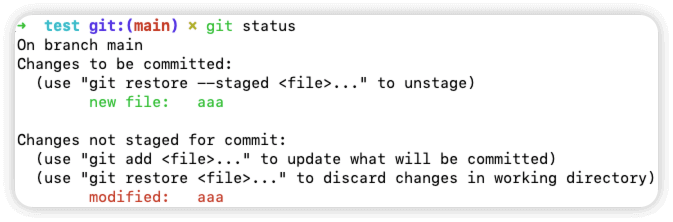
4.查看文件状态
$ git status
On branch master
Changes to be committed:
  (use "git restore --staged <file>..." to unstage)
	new file:   aaa

Changes not staged for commit:
  (use "git add <file>..." to update what will be committed)
  (use "git restore <file>..." to discard changes in working directory)
	modified:   aaa
5.从暂存区覆盖本地目录文件
$ git checkout -- aaa
$ git status
On branch master
Changes to be committed:
  (use "git restore --staged <file>..." to unstage)
	new file:   aaa
6.查看文件,此时文件已经恢复至原先内容
$ cat aaa
aaa
情况二:修改了工作目录文件后提交到了暂存区和本地仓库
1.创建文件bbb
$ touch bbb
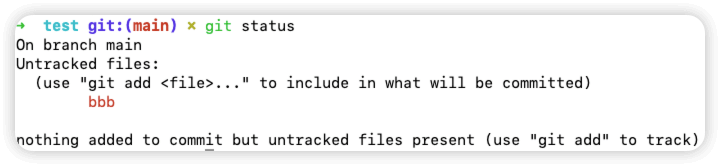
2.查看文件状态,此时文件是红色的,还没有提交到暂存区
$ git status
On branch master
Untracked files:
  (use "git add <file>..." to include in what will be committed)
	bbb

nothing added to commit but untracked files present (use "git add" to track)
3.往文件bbb中写入内容
$ echo bbb > bbb
$ cat bbb
bbb
4.提交文件bbb至暂存区
$ git add bbb
5.查看文件状态,此时文件是绿色的
$ git status
On branch master
Changes to be committed:
  (use "git restore --staged <file>..." to unstage)
	new file:   bbb
6.提交文件bbb至本地仓库
$ git commit -m 'bbb'
[master 1dbe8c2] bbb
 1 file changed, 1 insertion(+)
 create mode 100644 bbb
7.查看文件状态,此时暂存区中的文件已经提交到本地仓库了
$ git status
On branch master
nothing to commit, working tree clean
8.再次往文件bbb中追加内容,多次追加并提交
# 第一次,追加内容1到文件中,并提交至暂存区和本地仓库
$ echo 1 >> bbb
$ cat bbb
bbb
1
$ git add .
$ git commit -m 'echo 1 >> bbb'
[master 65d12a7] echo 1 >> bbb
 1 file changed, 1 insertion(+)

# 第二次,追加内容2到文件中,并提交至暂存区和本地仓库
$ echo 2 >> bbb
$ cat bbb
bbb
1
2
$ git add .
$ git commit -m 'echo 2 >> bbb'
[master da5695e] echo 2 >> bbb
 1 file changed, 1 insertion(+)
9.此时文件bbb内容如下
$ cat bbb
bbb
1
2

# 暂存区中没有内容
$ git status
On branch master
nothing to commit, working tree clean
10.查看日志
$ git log --oneline
da5695e (HEAD -> master) echo 2 >> bbb
65d12a7 echo 1 >> bbb
1dbe8c2 bbb
.........
11.恢复文件内容只有bbb
$ git reset --hard 1dbe8c2
HEAD is now at 1dbe8c2 bbb

$ cat bbb
bbb
12.恢复文件内容只有bbb和1
$ git reset --hard 65d12a7
HEAD is now at 65d12a7 echo 1 >> bbb
$ cat bbb
bbb
1
恢复至一个版本后,通过 git log 命令查看到的日志就只截止到当前版本,下一个版本的不会记录,因此,如果需要查看全部日志记录,需要用到命令 git reflog ,此时就可以根据 git reflog 恢复至任意版本了
$ git reflog
65d12a7 (HEAD -> master) HEAD@{0}: reset: moving to 65d12a7
1dbe8c2 HEAD@{1}: reset: moving to 1dbe8c2
da5695e HEAD@{2}: commit: echo 2 >> bbb
65d12a7 (HEAD -> master) HEAD@{3}: commit: echo 1 >> bbb
1dbe8c2 HEAD@{4}: commit: bbb
git reflog 查看全部日志记录
2.6.2 git恢复版本说明及重点
git恢复版本说明
git服务程序中有一个叫做HEAD的版本指针,当用户申请还原数据时,其实就是将HEAD指针指向到某个特定的提交版本,但是因为git是分布式版本控制系统,为了避免历史记录冲突,故使用了SHA-1计算出十六进制的哈希字串来区分每个提交版本,另外默认的HEAD版本指针会指向到最近的一次提交版本记录
git恢复版本重点
1.查看日志,获取对应的操作HEAD指针
2.根据获取到的HEAD指针然后进行 git reset --hard 指针编号
2.7 git分支
2.7.1 git分支命令总结
创建分支
git branch 分支名
切换分支
git checkout 分支名
列出分支
git branch
删除分支
git branch -d 分支名
合并分支
git merge 分支名
创建并切换分支
git checkout -b 分支名(创建分支的同时切换到这个分支)
2.7.2 git分支合并
master分支创建文件并写入内容
$ echo 'master分支创建的内容' > txt
$ git add .
$ git commit -m 'master分支创建的内容'
创建并切换到dev分支然后写入内容
# 切换到dev分支
$ git checkout -b dev
Switched to a new branch 'dev'

# 查看当前所在分支
$ git branch
* dev
  master

# 查看文件内容
$ cat txt
master分支创建的内容

# 向文件追加内容
$ echo 'dev分支创建的内容' >> txt
$ cat txt
master分支创建的内容
dev分支创建的内容

# 提交文件至本地仓库
$ git add .
$ git commit -m 'dev分支创建的内容'
切换到master分支,可以看到此时文件的内容还没有dev分支写入的内容,需要合并才可以显示
# 切换到master分支
$ git checkout master
Switched to branch 'master'

# 查看当前所在分支
$ git branch
  dev
* master

# 查看文件内容
$ cat txt
master分支创建的内容
合并分支,可以看到,合并分支后dev分支写入的内容此时已经有了
# 合并分支
$ git merge dev
Updating 1f0edf7..a87487f
Fast-forward
 txt | 1 +
 1 file changed, 1 insertion(+)

# 查看文件内容
$ cat txt
master分支创建的内容
dev分支创建的内容
2.7.3 git合并冲突
合并并不仅仅是简单的文件添加、移除的操作,git也会合并修改
在master分支创建一个空文件 test.txt ,注意这里为了演示冲突,不能将文件提交至master分支
# 查看当前所在分支
$ git branch
* master

# 创建空文件
$ touch test.txt
$ cat test.txt
创建一个dev分支并切换过去,然后修改 test.txt 文件的内容,并将 test.txt 文件的修改提交到dev分支
# 创建并切换到dev分支
$ git checkout -b dev
Switched to a new branch 'dev'

# 查看文件内容,为空
$ cat test.txt

# 向文件写入内容
$ echo 'dev分支修改test.txt文件' > test.txt
$ cat test.txt
dev分支修改test.txt文件

# 将文件提交至本地仓库
$ git add .
$ git commit -m 'dev分支修改test.txt文件'
[dev 3d85604] dev分支修改test.txt文件
 1 file changed, 1 insertion(+)
 create mode 100644 test.txt
切换回master分支,此时看不到 test.txt 文件,因为文件已经被提交到dev分支了,但是这里为了演示冲突手动再次向 test.txt 文件写入内容
# 查看当前所在分支
$ git branch
  dev
* master

# 查看当前目录下文件,发现并没有 test.txt 文件
$ ls

# 向文件写入内容
$ echo 'master分支修改test.txt文件' > test.txt

# 提交文件至本地仓库
$ git add .
$ git commit -m 'master分支修改文件'
[master 3eefd57] master分支修改文件
 1 file changed, 1 insertion(+)
 create mode 100644 test.txt
合并dev分支,此时会有冲突报错
$ git merge dev
CONFLICT (add/add): Merge conflict in test.txt
Auto-merging test.txt
Automatic merge failed; fix conflicts and then commit the result.
查看文件,有箭头的地方就是有冲突的地方,删除这部分再合并就可以了
$ cat test.txt
<<<<<<< HEAD
master分支修改test.txt文件
=======
dev分支修改test.txt文件
>>>>>>> dev
修改后的文件如下
$ cat test.txt
master分支修改test.txt文件
dev分支修改test.txt文件
解决分支冲突
# git add告诉git文件冲突已解决
$ git add .

# 提交文件至本地仓库
$ git commit -m '解决合并冲突'
[master 6fd4fd2] 解决合并冲突

# 合并分支
$ git merge dev
Already up to date.