使用harbor配置helm私有仓库
配置过程
创建项目
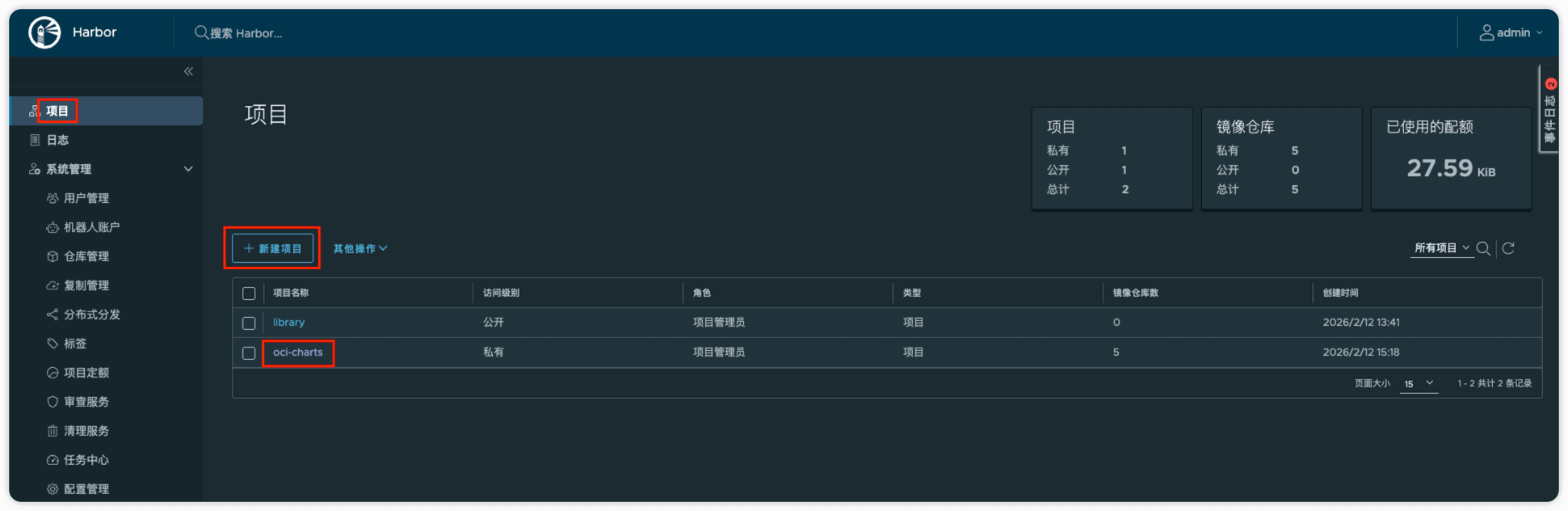
登陆harbor
helm registry login https://harbor.xxx.com
生成chart
helm create oci-chart-example
打包chart
helm package oci-chart-example
推送chart
说明
推送语法为 helm push <chart_name_and_version>.tgz oci://<harbor_address>/<project>
helm push oci-chart-example-0.1.0.tgz oci://harbor.pptfz.cn/oci-charts
拉取chart
说明
拉取语法为 helm pull oci://<harbor_address>/<project>/<chart_name> --version <version>
::;
helm pull oci://harbor.pptfz.cn/oci-charts/demo1 --version 0.1.0
推送报错 response status code 204: No Content 问题
推送报错 response status code 204: No Content ,harbor本身运行在http 8080端口,通过nginx进行的转发
$ helm push oci-chart-example-0.1.0.tgz oci://harbor.pptfz.cn/oci-charts
Error: failed to perform "Push" on destination: GET "https://harbor.pptfz.cn/v2/oci-charts/oci-chart-example/blobs/uploads/945ad9bd-8d11-49ba-9555-e922dc4c29e4?_state=XULkCurkzqd9AbCr6j3gQmJkOMhsMyqzfZ4HAS01oM17Ik5hbWUiOiJvY2ktY2hhcnRzL29jaS1jaGFydC1leGFtcGxlIiwiVVVJRCI6Ijk0NWFkOWJkLThkMTEtNDliYS05NTU1LWU5MjJkYzRjMjllNCIsIk9mZnNldCI6MCwiU3RhcnRlZEF0IjoiMjAyNi0wMi0xMlQwNzoxODo1NS4zMDkwMTI1NzZaIn0%3D&digest=sha256%3A6ccd75a14158b5e911f6648d45f6389708b21605bc13f4cf52cb37d47ee83a74": response status code 204: No Content
现在不通过nginx,直接访问harbor
注意
此方式在helm v4版本中是不可行的
$ helm registry login harbor.pptfz.cn:8080
Username: admin
Password:
Error: authenticating to "harbor.pptfz.cn:8080": Get "https://harbor.pptfz.cn:8080/v2/": http: server gave HTTP response to HTTPS client
$ helm registry login harbor.pptfz.cn:8080
Username: admin
Password:
Login Succeeded
然后推送就可以了
$ helm push helm-demo-0.1.0.tgz oci://harbor.pptfz.cn:8080/oci-charts
Pushed: harbor.pptfz.cn:8080/oci-charts/helm-demo:0.1.0
Digest: sha256:48a0f972f580384ab80adfa637e6e620fdc2cd49acf9796ad98c40aeca76319b
原先的nginx配置文件
server {
  listen 80;
  server_name harbor.pptfz.cn;
  return 301 https://$server_name$request_uri;
  client_max_body_size 1000m;
}

server {
  listen 443 ssl;
  server_name harbor.pptfz.cn;

  location / {
    proxy_pass http://127.0.0.1:8080;
    proxy_set_header Host $host;
    proxy_set_header X-Real-IP $remote_addr;
    proxy_set_header X-Forwarded-For $proxy_add_x_forwarded_for;
  }

  error_page 404 /index.html;

  access_log /var/log/harbor/harbor.pptfz.cn.access.log;
  error_log /var/log/harbor/harbor.pptfz.cn.error.log;
  ssl_certificate certs/harbor/public.pem;
  ssl_certificate_key certs/harbor/private.key;
  ssl_protocols TLSv1 TLSv1.1 TLSv1.2;
}
修改后的nginx配置文件
说明
新增了如下 location ^~ /v2/ 相关配置
    location ^~ /v2/ {
        proxy_pass http://127.0.0.1:8080;

        proxy_http_version 1.1;

        proxy_set_header Host $host;
        proxy_set_header X-Real-IP $remote_addr;
        proxy_set_header X-Forwarded-For $proxy_add_x_forwarded_for;
        proxy_set_header X-Forwarded-Proto $scheme;

        proxy_request_buffering off;
        proxy_buffering off;
        proxy_redirect off;

        chunked_transfer_encoding on;
    }
location ^~ /v2/
作用:
- 强制
/v2/规则优先级高于/ - 避免 OCI 上传请求被
/location 处理 - Harbor OCI 上传流程必须全部走同一套代理规则
proxy_redirect off
作用:
- 完全禁止 Nginx 修改后端返回的 Location / Refresh header,也就是 Harbor 返回什么,客户端就收到什么,不做任何处理
X-Forwarded-Proto
作用:
- 让 Harbor 知道外部访问是 https
server {
    listen 80;
    server_name harbor.pptfz.cn;

    client_max_body_size 0;

    return 301 https://$host$request_uri;
}


server {
    listen 443 ssl;
    server_name harbor.pptfz.cn;

    ssl_certificate certs/harbor/public.pem;
    ssl_certificate_key certs/harbor/private.key;
    ssl_protocols TLSv1.2 TLSv1.3;

    client_max_body_size 0;

    access_log /var/log/harbor/harbor.pptfz.cn.access.log;
    error_log  /var/log/harbor/harbor.pptfz.cn.error.log;

    ########################################################
    # Docker / Helm OCI Registry API
    ########################################################
    location ^~ /v2/ {
        proxy_pass http://127.0.0.1:8080;

        proxy_http_version 1.1;

        proxy_set_header Host $host;
        proxy_set_header X-Real-IP $remote_addr;
        proxy_set_header X-Forwarded-For $proxy_add_x_forwarded_for;
        proxy_set_header X-Forwarded-Proto $scheme;

        proxy_request_buffering off;
        proxy_buffering off;
        proxy_redirect off;

        chunked_transfer_encoding on;
    }

    ########################################################
    # Harbor UI / Chartmuseum / API
    ########################################################
    location / {
        proxy_pass http://127.0.0.1:8080;

        proxy_http_version 1.1;

        proxy_set_header Host $host;
        proxy_set_header X-Real-IP $remote_addr;
        proxy_set_header X-Forwarded-For $proxy_add_x_forwarded_for;
        proxy_set_header X-Forwarded-Proto $scheme;

        proxy_redirect off;
    }
}